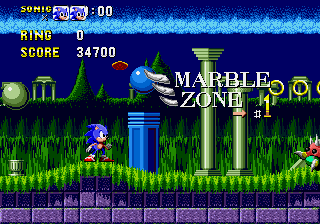
The game loads when you press Play · press “Play Now” inside the game if it asks.
Sonic The Hedgehog Pilot (Cancelled)
Sonic The Hedgehog Pilot
Sonic The Hedgehog Pilot on Genesis
- SEGA Genesis
- Platformer
- ROM Hack
- 5· 0 votes
Unofficial ROM hack. The notes below come from community sources and have not been verified against the patch itself, so levels, mechanics and features may differ from what is described.
GAME INFO
- Platform
- SEGA Genesis
- Genre
- Platformer
- Players
- 1
- Based on
- Sonic the Hedgehog
More Sonic the Hedgehog Games
Ready for another round? Explore more Sonic the Hedgehog games and console editions. Choose a game below to play it on its own page.






How to play Sonic The Hedgehog Pilot online
Getting Started
When the game starts, you will see a title screen. Press Enter (Start) to begin. The hack only has two beatable zones, so you will start in the first zone. Controls are the same as the original Sonic: use the D-Pad to move, X to jump, and S to spin dash.
Expect the game to be rough. Some levels may have missing objects or broken collision. If you get stuck, try restarting. There is no save feature. The goal is simply to reach the end of each zone. Since the hack is cancelled, do not expect a proper ending.
This is a curiosity for fans. If you are not familiar with the original Sonic, play that first. This hack is for seeing what an early, unfinished version looks like, not for a complete gameplay experience.
CONTROLS
Controls
- Arrow Keys: D-Pad / Movement
- X: A button
- S: B button
- Z: C button
- A: X button (6-button pad)
- Q: Y button (6-button pad)
- E: Z button (6-button pad)
- Enter: Start / Mode
Sonic The Hedgehog Pilot FAQ
What makes Sonic The Hedgehog Pilot stand out among SEGA Genesis titles of its era?
It stands out because it is an incomplete, cancelled hack rather than a commercial release. Only two zones are fully playable, giving a glimpse into early fan development. Most Genesis games were polished, so this rough state is unusual.
Is Sonic The Hedgehog Pilot exclusive to SEGA Genesis or did it appear on other systems?
This hack was made for the SEGA Genesis and likely only exists as a ROM file for emulators. No evidence suggests it appeared on other platforms.
Does Sonic The Hedgehog Pilot have a multiplayer or co-op mode?
No. Like the original Sonic the Hedgehog, this hack is single-player only. There is no multiplayer or co-op mode included or even hinted at in the incomplete state.
You may also like
All SEGA Genesis games











GAME INFO
- Platform
- SEGA Genesis
- Genre
- Platformer
- Players
- 1
- Based on
- Sonic the Hedgehog
COMMENTS (0)
No comments yet. Be the first to share your thoughts.