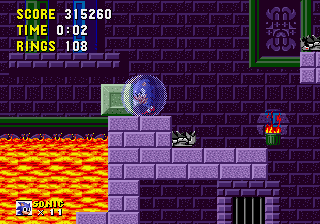
The game loads when you press Play · press “Play Now” inside the game if it asks.
Sonic Speedrun
Sonic Speedrun
Sonic Speedrun: Genesis Platformer
- SEGA Genesis
- Platformer
- ROM Hack
- 5· 0 votes
Unofficial ROM hack. The notes below come from community sources and have not been verified against the patch itself, so levels, mechanics and features may differ from what is described.
The core loop is simple: pick a level and race through it as fast as possible, collecting rings and avoiding obstacles. Unlike the original games, this hack may strip out extraneous story elements or cutscenes to keep the action focused. Expect the same spin-dash mechanics and ring-based health system, but with levels possibly altered to remove unintended shortcuts or to add new time-saving paths. The goal is to achieve the fastest clear time, often with leaderboard-style tracking.
For fans of speedrunning, this hack offers a distilled challenge that removes some of the exploration of the original in favor of pure momentum. It's a niche title, best appreciated by players who already know the physics of classic Sonic games and want a more directed time-attack experience. If you're just looking to play a faithful Sonic game, stick with the originals - this is a rough-edged experiment built for one specific purpose.
GAME INFO
- Platform
- SEGA Genesis
- Genre
- Platformer
- Players
- 1
How to play Sonic Speedrun online
Getting Started
When the game boots, you'll likely see a title screen - press Start (Enter) to begin. If this hack is based on Sonic 1, you'll be dropped into Green Hill Zone with no menu. Some versions may have a simple level select screen. Use the D-Pad to move Sonic, X to jump, and S to spin-dash (hold down and press jump).
The entire game revolves around completing each act as quickly as possible. Rings still protect you from one hit, so grab them as you blaze through. There's no multiplayer mode - this is strictly a solo time-trial affair. Because it's a fan hack, don't expect any tutorials; the game assumes you already know how to play classic Sonic.
Pay attention to the timer on screen. If you die, you'll restart the act (or the level, depending on the hack). The key is memorizing the level layout and finding the fastest route. If the hack is in English (most are), menus will be straightforward. If any text appears in Japanese, just use navigation based on button prompts.
CONTROLS
Controls
- Arrow Keys: D-Pad / Movement
- X: A button
- S: B button
- Z: C button
- A: X button (6-button pad)
- Q: Y button (6-button pad)
- E: Z button (6-button pad)
- Enter: Start / Mode
Sonic Speedrun FAQ
Which regions was Sonic Speedrun released in?
Information about official regional releases doesn't apply here - this is a fan-made ROM hack distributed online. It was never sold in stores, so there's no Japan/USA/Europe distinction. The hack exists as a download file on various retro gaming sites.
Does Sonic Speedrun have a multiplayer or co-op mode?
No multiplayer or co-op mode exists. The hack is designed purely for single-player speedrunning. You race against the clock, not against another player. Some versions may include a ghost feature, but that's unconfirmed.
Is Sonic Speedrun considered easy to pick up or challenging?
If you're already comfortable with classic Sonic physics and level layouts, it's fairly straightforward - the hack doesn't add new controls. But the speedrun focus makes it challenging by design: you need precision, memorization, and quick reflexes to beat your personal best. Casual players might find it frustrating.
You may also like
All SEGA Genesis games











GAME INFO
- Platform
- SEGA Genesis
- Genre
- Platformer
- Players
- 1
COMMENTS (0)
No comments yet. Be the first to share your thoughts.