The game loads when you press Play · press “Play Now” inside the game if it asks.
Sonic 2 Modern Neon & Classic Neon
Sonic 2 Modern Neon & Classic Neon
Sonic 2 Modern Neon & Classic Neon - Platformer Classic
- SEGA Genesis
- Platformer
- ROM Hack
- 5· 0 votes
Unofficial ROM hack. The notes below come from community sources and have not been verified against the patch itself, so levels, mechanics and features may differ from what is described.
GAME INFO
- Platform
- SEGA Genesis
- Genre
- Platformer
- Based on
- Sonic the Hedgehog 2
More Sonic the Hedgehog Games
Ready for another round? Explore more Sonic the Hedgehog games and console editions. Choose a game below to play it on its own page.






How to play Sonic 2 Modern Neon & Classic Neon online
Getting Started
This is a hacked version of Sonic 2, so the objective remains the same. Start by selecting one player or two players from the title screen (use Start to confirm and Arrow Keys to navigate). In single player you control Sonic, while Tails follows behind and can be controlled by a second player if you choose two-player mode.
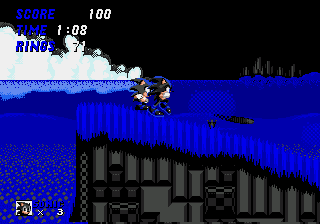
The gameplay loop is straightforward: run to the right through each act, collect rings to protect yourself from damage, and defeat Dr. Robotnik's badniks by jumping on them or using the spin dash (hold down and press jump). Reach the giant ring or the end of the act to pass the checkpoint star post, and ultimately defeat Robotnik at the end of each zone to proceed. The only twist here is the visual overhaul - all sprites and backgrounds are recolored in neon shades, so you may need a moment to adjust to the new palette.
A few practical tips: save your rings because losing them costs you a life if hit again. Spin dash is your best tool for speed and offense. The emulator controls listed above match the Genesis layout; spend a minute replaying the first act to get comfortable with the keyboard mapping before tackling the later, more challenging stages.
CONTROLS
Controls
- Arrow Keys: D-Pad / Movement
- X: A button
- S: B button
- Z: C button
- A: X button (6-button pad)
- Q: Y button (6-button pad)
- E: Z button (6-button pad)
- Enter: Start / Mode
Sonic 2 Modern Neon & Classic Neon FAQ
Is there anything iconic or memorable about Sonic 2 Modern Neon & Classic Neon?
The main draw is the vibrant neon recoloring, which gives classic Sonic 2 a modernized, almost arcade-like appearance. It's a fun way to experience the original levels through a fresh visual lens, though the core gameplay remains unchanged.
Is Sonic 2 Modern Neon & Classic Neon exclusive to SEGA Genesis or did it appear on other systems?
This hack is exclusive to the SEGA Genesis platform, designed to run on the original hardware via flash carts or emulators. It has not been officially released on any other system.
Is Sonic 2 Modern Neon & Classic Neon considered easy to pick up or challenging?
The difficulty mirrors the original Sonic 2 exactly, which starts easy but ramps up significantly in later zones. Veterans of the series will find it familiar, while newcomers may struggle with the speed and precision required in later acts.
You may also like
All SEGA Genesis games











GAME INFO
- Platform
- SEGA Genesis
- Genre
- Platformer
- Based on
- Sonic the Hedgehog 2
COMMENTS (0)
No comments yet. Be the first to share your thoughts.