The game loads when you press Play · press “Play Now” inside the game if it asks.
Sonic 1 - Galaxy Edition
Sonic 1 - Galaxy Edition
Inside Sonic 1 - Galaxy Edition
- SEGA Genesis
- Platformer
- ROM Hack
- 5· 0 votes
Unofficial ROM hack. The notes below come from community sources and have not been verified against the patch itself, so levels, mechanics and features may differ from what is described.
GAME INFO
- Platform
- SEGA Genesis
- Genre
- Platformer
- Players
- 1
- Based on
- Sonic the Hedgehog
More Sonic the Hedgehog Games
Ready for another round? Explore more Sonic the Hedgehog games and console editions. Choose a game below to play it on its own page.






How to play Sonic 1 - Galaxy Edition online
CONTROLS
Controls
- Arrow Keys: D-Pad / Movement
- X: A button
- S: B button
- Z: C button
- A: X button (6-button pad)
- Q: Y button (6-button pad)
- E: Z button (6-button pad)
- Enter: Start / Mode
Sonic 1 - Galaxy Edition FAQ
What type of game is Sonic 1 - Galaxy Edition?
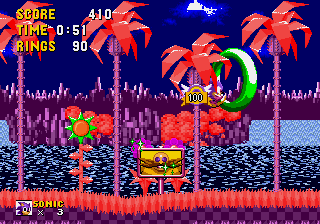
Sonic 1 - Galaxy Edition is a graphically altered version of the original Sonic the Hedgehog for the SEGA Genesis. It replaces the standard tropical and industrial themes with a space and galaxy aesthetic.
Is Sonic 1 - Galaxy Edition an official release, a fan hack, a prototype, or another kind of build?
It is a fan-made ROM hack, not an official Sega product, prototype, or beta build. It was created by modifying the original Sonic 1 ROM.
Who developed Sonic 1 - Galaxy Edition?
The specific creator or team behind this hack is not widely documented. The modification is typically attributed to an anonymous fan or hobbyist modder.
You may also like
All SEGA Genesis games











GAME INFO
- Platform
- SEGA Genesis
- Genre
- Platformer
- Players
- 1
- Based on
- Sonic the Hedgehog
COMMENTS (0)
No comments yet. Be the first to share your thoughts.