The game loads when you press Play · press “Play Now” inside the game if it asks.
Skitchin (USA, Europe)
Skitchin
Skitchin Overview
- SEGA Genesis
- Racing
- 5· 0 votes
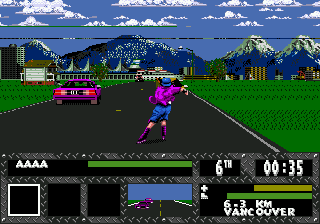
Skitchin is a rough-and-tumble racing game for the SEGA Genesis, released in the USA and Europe in 1994. It was published by Electronic Arts, known for their sports titles, but this one takes a more aggressive approach. The game blends high-speed rollerblading with combat, letting you grab onto vehicles to skitch and then fight other skaters.
You control a rollerblader in a series of races that are less about crossing the finish line first and more about survival. The core mechanic is skitching - grabbing onto the back of a car to gain speed. While racing, you can punch, kick, and use weapons against opponents to knock them down. The tracks are city streets filled with traffic, making the whole experience chaotic.
Skitchin stands out for its aggressive combat and unique premise. It's not a polished racing sim; instead, it captures the early 90s extreme sports vibe. Compared to other Genesis racing games like Road Rash, Skitchin trades motorcycles for inline skates and replaces some of the strategic combat with straight-up brawling. It's a niche title but worth a look for fans of brutal sports games.
GAME INFO
- Platform
- SEGA Genesis
- Genre
- Racing
- Released
- 1994
- Region
- USA, Europe
How to play Skitchin online
When you start Skitchin, you pick a character and then begin a race. The key to winning is not just speed but staying upright. Use the D-Pad to steer and dodge traffic. To skitch, approach a car from behind and press the attack button to grab on. This gives you a speed boost but leaves you vulnerable. The race is a loop where you must survive until the end.
New players should focus on learning to skitch without crashing and using weapons wisely. The game has a learning curve, but once you get the hang of it, the mayhem is addictive. Keep an eye on your stamina bar; if it drops too low, you'll slow down and be an easy target. Experiment with different characters to find one whose stats match your play style.
CONTROLS
Controls
- Arrow Keys: D-Pad / Movement
- X: A button
- S: B button
- Z: C button
- A: X button (6-button pad)
- Q: Y button (6-button pad)
- E: Z button (6-button pad)
- Enter: Start / Mode
Skitchin FAQ
Is Skitchin exclusive to SEGA Genesis or did it appear on other systems?
Skitchin was released exclusively for the SEGA Genesis. It never appeared on other home consoles or handhelds, making it a Genesis-only experience.
In what year was Skitchin originally released?
Skitchin originally launched in 1994. It came out in both North America and Europe that same year.
Who developed Skitchin?
Skitchin was developed by Electronic Arts, specifically by a team within EA's internal studios. The publisher was also Electronic Arts, handling distribution.
You may also like
All SEGA Genesis games











GAME INFO
- Platform
- SEGA Genesis
- Genre
- Racing
- Released
- 1994
- Region
- USA, Europe
COMMENTS (0)
No comments yet. Be the first to share your thoughts.