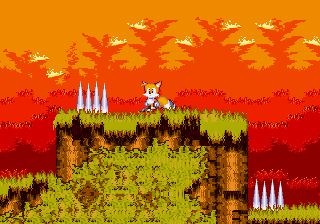
The game loads when you press Play · press “Play Now” inside the game if it asks.
SHC2024 SONIC SMD
SHC2024 SONIC SMD
SHC2024 SONIC SMD: Genesis Platformer
- SEGA Genesis
- Platformer
- ROM Hack
- 5· 0 votes
Unofficial ROM hack. The notes below come from community sources and have not been verified against the patch itself, so levels, mechanics and features may differ from what is described.
GAME INFO
- Platform
- SEGA Genesis
- Genre
- Platformer
- Players
- 1
How to play SHC2024 SONIC SMD online
Getting Started
Load the game and press Enter (Start) to begin. You control Sonic through a series of platforming stages. Use the Arrow Keys to move left and right, and press X to jump. While running, press and hold X again to execute a spin dash if the hack supports it - otherwise, just hold down on the D-Pad while stationary to charge.
The core objective is to reach the goal sign at the end of each zone. Collect rings to protect yourself from enemy damage, and defeat enemies by jumping on them or using a spin attack. Watch out for pits, spikes, and traps. You have a limited number of lives; losing them all sends you back to the start of the game.
If this hack includes any new mechanics (like a different character or special items), they will likely be explained in the game's title screen or level start. Since it's a contest entry, the game is usually short - often just one or two acts. Take your time to explore and find any hidden secrets the creator may have added.
CONTROLS
Controls
- Arrow Keys: D-Pad / Movement
- X: A button
- S: B button
- Z: C button
- A: X button (6-button pad)
- Q: Y button (6-button pad)
- E: Z button (6-button pad)
- Enter: Start / Mode
SHC2024 SONIC SMD FAQ
What type of game is SHC2024 SONIC SMD?
It is a ROM hack of a classic Sonic the Hedgehog game for the Sega Genesis, submitted to the Sonic Hacking Contest in 2024. It falls under the platformer genre, retaining the original's high-speed action.
Which regions was SHC2024 SONIC SMD released in?
As a ROM hack, it does not have a commercial regional release. It is distributed digitally within the hacking community, typically accessible worldwide via sites like retrogames.cc.
Is there anything iconic or memorable about SHC2024 SONIC SMD?
Its main claim to fame is being part of the 2024 Sonic Hacking Contest, a yearly event that showcases creative modifications. The hack's specific changes are not widely documented, but it serves as a snapshot of the contest's output.
You may also like
All SEGA Genesis games











GAME INFO
- Platform
- SEGA Genesis
- Genre
- Platformer
- Players
- 1
COMMENTS (0)
No comments yet. Be the first to share your thoughts.