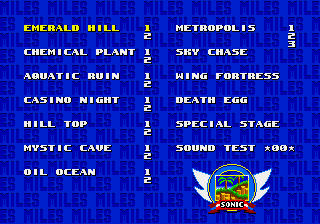
The game loads when you press Play · press “Play Now” inside the game if it asks.
S1 Physics in Sonic 2
S1 Physics in Sonic 2
What is S1 Physics in Sonic 2?
- SEGA Genesis
- Platformer
- Mod
- 5· 0 votes
Unofficial mod. The notes below come from community sources and have not been verified against the patch itself, so levels, mechanics and features may differ from what is described.
GAME INFO
- Platform
- SEGA Genesis
- Genre
- Platformer
- Based on
- Sonic the Hedgehog 2
More Sonic the Hedgehog Games
Ready for another round? Explore more Sonic the Hedgehog games and console editions. Choose a game below to play it on its own page.






How to play S1 Physics in Sonic 2 online
Getting Started
This is a mod of Sonic the Hedgehog 2, so the basic structure is the same. You start at the beginning of Emerald Hill Zone. Move right using the D-Pad, jump with the A button (X on keyboard), and spin dash by holding down and pressing jump. The biggest difference here is the physics: momentum builds up more slowly and turns feel tighter, so you'll need to adjust your timing for jumps and loops.
The core loop is simple: run through each act, collect rings for protection, defeat enemies, and reach the giant ring at the end. After clearing both acts of a zone, you face a boss. Keep an eye on your rings - if you get hit without rings, you lose a life. Checkpoints let you restart from a safe spot if you die.
For new players, take it slow at first to get a feel for the altered physics. The spin dash works like it did in Sonic 1 - hold down, press jump to charge, then release to dash. Mastering that and knowing when to roll uphill will help you keep speed. The mod doesn't change level layouts, so any Sonic 2 guide can still help with tricky sections.
CONTROLS
Controls
- Arrow Keys: D-Pad / Movement
- X: A button
- S: B button
- Z: C button
- A: X button (6-button pad)
- Q: Y button (6-button pad)
- E: Z button (6-button pad)
- Enter: Start / Mode
S1 Physics in Sonic 2 FAQ
Is there anything iconic or memorable about S1 Physics in Sonic 2?
It's memorable for being a faithful port of Sonic 1's physics into Sonic 2's levels, something many fans have wanted for years. The change in momentum and spin dash behavior gives a noticeably different feel without altering the level design.
Is S1 Physics in Sonic 2 exclusive to SEGA Genesis or did it appear on other systems?
This mod is exclusive to the SEGA Genesis version of Sonic 2 as a fan-made patch. It has not been officially released on any other system, though it can be played through emulation on modern devices.
Who developed S1 Physics in Sonic 2?
The specific developer or username is not widely documented beyond being a community mod posted on sites like GameBanana. Since it's a fan project, no official development studio is credited.
You may also like
All SEGA Genesis games











GAME INFO
- Platform
- SEGA Genesis
- Genre
- Platformer
- Based on
- Sonic the Hedgehog 2
COMMENTS (0)
No comments yet. Be the first to share your thoughts.