🔊 Tap Play, then press “Play Now”

Roger Clements MVP Baseball (USA)

0 Favorites 0 Likes 16 Views
Rate this game:
Embed Code
Roger Clements MVP Baseball (USA)
SEGA Genesis Sports USA 1-2 Players 5 (0) 16

Roger Clements MVP Baseball (USA)

Roger Clements MVP Baseball (USA) on Genesis

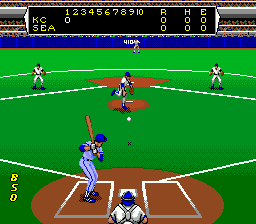
Roger Clements MVP Baseball is a sports game for the SEGA Genesis, released in North America. It features the name and likeness of Hall of Fame pitcher Roger Clemens. The game was one of several baseball titles on the Genesis during the early 1990s, aiming to capitalize on the sport's popularity.

The player takes control of a baseball team and competes in simulated games. Core actions include pitching with various speeds and locations, batting with timing and power, and fielding to make outs. The game follows standard baseball rules with innings, outs, and runs. The controls respond to the Genesis pad, offering a straightforward arcade-style experience.

For retro baseball fans, Roger Clements MVP Baseball offers a quick pick-up-and-play experience typical of 16-bit sports games. It doesn't have the depth of later sims, but its simple mechanics and licensed star make it a notable entry in the Genesis library. It's worth trying if you enjoy early 90s arcade sports.

How to Play Roger Clements MVP Baseball (USA) Online

Section 1 - Controls

Section 2 - Getting Started
When you start the game, you'll see a title screen and then a menu to choose teams and options. Press Start to proceed. The core gameplay involves pitching and batting. Use the D-Pad to aim pitches and swing. The A button (X key) confirms selections. In the field, you control the fielder to catch and throw. The game is straightforward: try to score more runs than the opponent in 9 innings.

The timing of your swing and pitch selection matters. Fastballs are easier to hit but can be overpowered; slower pitches may fool batters. On defense, position the fielder with the D-Pad and press the action button to make plays. There are no complex rule differences from standard baseball, so the focus is on reflexes and basic strategy.

If you are new to retro baseball games, start by playing a single exhibition game to learn the controls. The menu options are in English, so navigating is simple. Once you get the hang of pitching and batting, you can try a full season mode if available.

Roger Clements MVP Baseball (USA) Keyboard Controls

Controls

  • Arrow Keys: D-Pad / Movement
  • X: A button
  • S: B button
  • Z: C button
  • A: X button (6-button pad)
  • Q: Y button (6-button pad)
  • E: Z button (6-button pad)
  • Enter: Start / Mode

Frequently Asked Questions

Roughly how long does it take to finish Roger Clements MVP Baseball?
A typical nine-inning game lasts about 15 - 20 minutes, depending on scoring and play pace. There is no story mode, so finishing a single game is the core experience. Playing a full season of multiple games could take several hours.
Is Roger Clements MVP Baseball exclusive to SEGA Genesis or did it appear on other systems?
An NES version was also released, with different graphics and gameplay. The Genesis version offers improved audio and visuals compared to its 8-bit counterpart. Both versions share the same licensed athlete.
In what year was Roger Clements MVP Baseball originally released?
The exact release year is not widely documented; it is generally considered to have been released in the early 1990s. The NES version came out in 1990, and the Genesis version likely followed around 1991 or 1992, though precise records are sparse.

Comments (0)

    More Sports Games











