The game loads when you press Play · press “Play Now” inside the game if it asks.
Richard Scarry's BusyTown (USA)
Richard Scarry's BusyTown
What is Richard Scarry's BusyTown?
- SEGA Genesis
- Educational
- 5· 0 votes
GAME INFO
- Platform
- SEGA Genesis
- Genre
- Educational
- Players
- 1
- Region
- USA
How to play Richard Scarry's BusyTown online
Getting Started
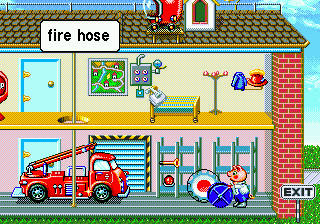
When you start the game, you'll see a title screen followed by a main menu. Use the D-Pad (Arrow Keys) to highlight a destination on the map of Busytown. Each location leads to a different minigame. Press X (A button) to confirm your choice and begin the activity.
The core gameplay loop involves entering a location, playing a short educational game (like identifying a shape or counting objects), then returning to the map to pick another. There is no penalty for mistakes - the games are designed to be forgiving for young children. If you get stuck, press S (B button) to cancel or back out to the previous screen.
New players should simply explore each area to see what activities are available. The interface is very straightforward, with large, colorful graphics and voice cues that guide you through each task. No reading is required for basic navigation, making it suitable for pre-readers.
CONTROLS
Controls
- Arrow Keys: D-Pad / Movement
- X: A button
- S: B button
- Z: C button
- A: X button (6-button pad)
- Q: Y button (6-button pad)
- E: Z button (6-button pad)
- Enter: Start / Mode
Richard Scarry's BusyTown FAQ
Which regions was Richard Scarry's BusyTown released in?
Richard Scarry's BusyTown for the SEGA Genesis was released only in North America (USA). There are no known European or Japanese releases of this particular version.
Is Richard Scarry's BusyTown exclusive to SEGA Genesis or did it appear on other systems?
This title was designed specifically for the SEGA Genesis and does not appear on other home consoles. A separate PC version with similar content was released around the same time, but the Genesis release is unique to that platform.
What type of game is Richard Scarry's BusyTown?
It is an educational game aimed at preschool children. The gameplay consists of several minigames that teach basic vocabulary, shapes, numbers, and simple math in a context inspired by Richard Scarry's books.
You may also like
All SEGA Genesis games











GAME INFO
- Platform
- SEGA Genesis
- Genre
- Educational
- Players
- 1
- Region
- USA
COMMENTS (0)
No comments yet. Be the first to share your thoughts.