The game loads when you press Play · press “Play Now” inside the game if it asks.
Pele! (USA, Europe)
Pele!
Getting to Know Pele!
- SEGA Genesis
- Sports
- 5· 0 votes
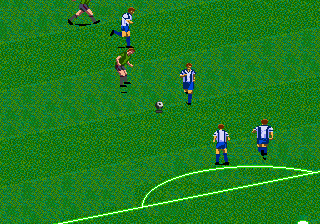
"Pele!" is a soccer video game released for the Sega Genesis in 1996. It was developed by Radical Entertainment and published by Sega, landing in both North America and Europe. This is an officially licensed title featuring the Brazilian football legend, not a hack or homebrew.
The game puts you in control of international teams as you play a standard 11-on-11 soccer match. You can pass, shoot, and tackle using simplified controls typical of the era. Modes include exhibition matches and a tournament where you compete for the championship. The gameplay is arcade-like, with a fast pace and responsive controls.
For its time, "Pele!" offered a decent alternative to the EA Sports soccer games, especially because of the Pele license. It is not as complex as modern sims, but it is a fun pick-up-and-play title for retro sports fans. If you enjoy Genesis soccer games like "FIFA" or "World Championship Soccer," this one is worth a look, but it remains a niche entry in the library.
GAME INFO
- Platform
- SEGA Genesis
- Genre
- Sports
- Released
- 1996
- Players
- 1-2
- Region
- USA, Europe
How to play Pele! online
Section 2 - Getting Started
When you first start "Pele!," you will see a title screen. Press Start to go to the main menu. From there you can choose to play a quick exhibition match or enter a tournament mode. Pick your team and set the match length before kicking off. The core gameplay revolves around moving your player with the D-Pad and using the A (X key) to sprint or the B (S key) to pass and shoot. Timing is important for tackles and headers. Try to pass the ball around to create scoring opportunities. If you have never played a Genesis soccer game, start with exhibition mode to get used to the controls. The game does not have overly complex tactics, so focus on positioning and quick passes. If you lose the ball, chase it with your nearest player and press the run button to close down the opponent.CONTROLS
Controls
- Arrow Keys: D-Pad / Movement
- X: A button
- S: B button
- Z: C button
- A: X button (6-button pad)
- Q: Y button (6-button pad)
- E: Z button (6-button pad)
- Enter: Start / Mode
Pele! FAQ
Is Pele! considered easy to pick up or challenging?
"Pele!" is fairly straightforward to pick up, especially if you have played arcade-style soccer games before. The controls are simple, but the AI can provide a decent challenge on higher difficulty levels.
In what year was Pele! originally released?
The game was originally released in 1996 for the Sega Genesis in North America and Europe.
Is Pele! exclusive to SEGA Genesis or did it appear on other systems?
"Pele!" was released on the Sega Genesis and also appeared on the Super Nintendo Entertainment System around the same time.
You may also like
All SEGA Genesis games











GAME INFO
- Platform
- SEGA Genesis
- Genre
- Sports
- Released
- 1996
- Players
- 1-2
- Region
- USA, Europe
COMMENTS (0)
No comments yet. Be the first to share your thoughts.