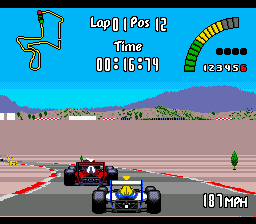
The game loads when you press Play · press “Play Now” inside the game if it asks.
Nigel Mansell's World Championship Racing (USA)
Nigel Mansell's World Championship Racing
What is Nigel Mansell's World Championship Racing?
- SEGA Genesis
- Racing
- 5· 0 votes
GAME INFO
- Platform
- SEGA Genesis
- Genre
- Racing
- Publisher
- Gremlin Interactive
- Developer
- Gremlin Interactive
- Released
- 1993
- Players
- 1
- Region
- USA
How to play Nigel Mansell's World Championship Racing online
Getting Started
Jump into the main menu and pick a game mode - typically Championship, Single Race, or Time Trial. In Championship mode you'll run a full season of circuits, each with a qualifying session to set your grid position. The core loop is straightforward: qualify as high as you can, then race against computer opponents over several laps on tracks inspired by real F1 venues.
Pay attention to your car's gearbox and tires - you can pit for repairs and new rubber, but the pit stop interface is simple. Brake early into hairpins and use the racing line to shave seconds. Poor driving wears your tires faster, so consistency beats raw speed. The game uses a fixed overhead view, so you always see upcoming corners. Mastering the slipstream behind rivals can give you a boost on straights.
New players should start with Practice or a Single Race to feel the grip and braking points. There's no complex setup - just pick a car (Mansell's Williams-Renault or an alternate) and go. The season mode tracks points and standings, but don't worry about penalties; the game focuses on arcade fun over simulation. If you get stuck, try reducing the difficulty setting in the options menu before the race.
CONTROLS
Controls
- Arrow Keys: D-Pad / Movement
- X: A button
- S: B button
- Z: C button
- A: X button (6-button pad)
- Q: Y button (6-button pad)
- E: Z button (6-button pad)
- Enter: Start / Mode
Nigel Mansell's World Championship Racing FAQ
Who developed Nigel Mansell's World Championship Racing?
Gremlin Graphics developed the game for multiple platforms, including the SEGA Genesis port released in 1993.
Is Nigel Mansell's World Championship Racing exclusive to SEGA Genesis or did it appear on other systems?
It first appeared on Amiga and DOS computers, then was ported to home consoles like the SEGA Genesis, Super Nintendo, and Game Gear. Not a Genesis exclusive.
Is Nigel Mansell's World Championship Racing an official release, a fan hack, a prototype, or another kind of build?
It is an official commercial release, licensed by Nigel Mansell and published by Gremlin Graphics for the Genesis. No fan modification or prototype.
You may also like
All SEGA Genesis games











GAME INFO
- Platform
- SEGA Genesis
- Genre
- Racing
- Publisher
- Gremlin Interactive
- Developer
- Gremlin Interactive
- Released
- 1993
- Players
- 1
- Region
- USA
COMMENTS (0)
No comments yet. Be the first to share your thoughts.