The game loads when you press Play · press “Play Now” inside the game if it asks.
NFL 98 (USA)
NFL 98
About NFL 98
- SEGA Genesis
- Sports
- 5· 0 votes
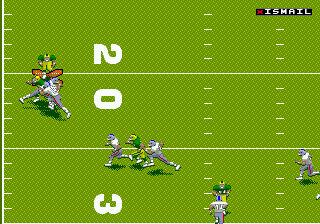
This is a full simulation of American football. You pick an NFL team, then play through exhibition games or a full season. On the field you control the quarterback, running backs, receivers, and defensive players. Play calling comes from a playbook, and you execute passes, runs, blocks, and tackles using the Genesis pad. The game includes the actual NFL teams and players from 1997, plus basic stat tracking.
For retro football fans, NFL 98 represents the peak of the 16-bit Madden era. It has smooth sprite animation, digitized speech for referee calls, and a decent sense of realism for its time. If you grew up with console football games in the late 90s, this one holds up as a solid, single-screen simulation. It is not fancy or deep by modern standards, but it captures the feeling of the sport in a way that many later 3D titles lost. Worth a look if you appreciate old-school sports gaming.
GAME INFO
- Platform
- SEGA Genesis
- Genre
- Sports
- Developer
- FarSight Studios
- Released
- 1997
- Players
- 1-2
- Region
- USA
How to play NFL 98 online
Getting Started
When you start NFL 98 on Genesis, the main menu offers exhibition, season, and playoff modes. For a quick game, choose Exhibition and pick a team from the AFC or NFC. The game then asks whether you want to play against the computer or another player. Once teams are set, you kick off and take control of the offense or defense.
The core loop is calling plays from your playbook, then executing them on the field. On offense, you select a formation and a specific play (run, pass, or option). After the snap, you control the quarterback: pass to a receiver by pressing the button mapped to that receiver's route, or hand off to the running back. On defense you choose a formation and then control the player nearest the ball. The game includes settings for quarter length and difficulty. New players should start on the easiest difficulty to get comfortable with the controls and play calling.
CONTROLS
Controls
- Arrow Keys: D-Pad / Movement
- X: A button
- S: B button
- Z: C button
- A: X button (6-button pad)
- Q: Y button (6-button pad)
- E: Z button (6-button pad)
- Enter: Start / Mode
NFL 98 FAQ
Which regions was NFL 98 released in?
NFL 98 was released in North America under the title "NFL 98" on the SEGA Genesis. There is no documented PAL or Japanese release for this exact version; the Madden series had separate regional naming and the 1997 edition came out only in the USA.
Is NFL 98 an official release, a fan hack, a prototype, or another kind of build?
This is an officially licensed retail game published by EA Sports. It is not a hack, prototype, homebrew, or any kind of mod. It was sold in stores as part of the Madden NFL series.
What makes NFL 98 stand out among SEGA Genesis titles of its era?
It was the last Madden game to appear on the Genesis, wrapping up the franchise's 16-bit run. It also features digitized voice for referee calls and the real 1997 NFL rosters, making it a solid time capsule of late‑90s console football.
You may also like
All SEGA Genesis games











GAME INFO
- Platform
- SEGA Genesis
- Genre
- Sports
- Developer
- FarSight Studios
- Released
- 1997
- Players
- 1-2
- Region
- USA
COMMENTS (0)
No comments yet. Be the first to share your thoughts.