The game loads when you press Play · press “Play Now” inside the game if it asks.
New 3D Golf Simulation Waialae no Kiseki (Japan)
New 3D Golf Simulation Waialae no Kiseki
New 3D Golf Simulation Waialae no Kiseki - Sports Classic
- SEGA Genesis
- Sports
- 5· 0 votes
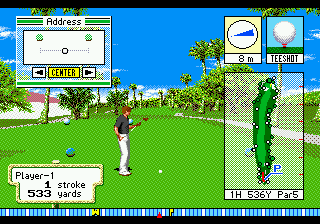
The player controls a golfer navigating the Waialae Country Club course in Hawaii. You select a club, adjust your aim, and time your swing using a power meter that determines shot strength. The game uses a top-down map for planning shots and switches to a 3D view during the swing and putting. Wind and terrain factors affect ball trajectory, adding a layer of strategy. Matches follow standard golf rules, with the goal being the lowest score over 18 holes.
This title stands out for its early attempt at 3D graphics in a golf game on the Genesis. The sprite-based course and player models were ambitious for the hardware. While it never left Japan, it remains a solid entry in the sports library for retro enthusiasts who appreciate niche imports. It is not flashy or groundbreaking, but it delivers a straightforward golf sim experience that fans of the genre will find serviceable.
GAME INFO
- Platform
- SEGA Genesis
- Genre
- Sports
- Released
- 1994
- Players
- 1
- Region
- Japan
How to play New 3D Golf Simulation Waialae no Kiseki online
Getting Started
When the game boots, you will see a Japanese title screen. Press Start to advance through menus. Use the D-Pad to navigate options; confirm with X and cancel with S. The main menu lets you start a round or adjust settings. Since the interface is in Japanese, memorizing menu order can help: the first option is usually "Start Game" or "New Round."
Once in a round, you control your golfer from a top-down overview. Press X to bring up the club selection screen. Pick a club based on distance to the hole, then aim with the D-Pad. When ready, press X again to start the swing. A power meter scrolls up and down; press X a second time to set power, then a third time to set accuracy. The game calculates the shot based on timing and wind conditions displayed on screen.
Putting uses a similar meter but on a flat green. Read the grid overlay for slopes. The key is to keep practicing the rhythm of the power meter - hitting it consistently is the main skill. If you get stuck, look for a course map option that shows hole layouts. This is a straightforward golf sim with solid physics for its era, so patience and repetition will improve your score.
CONTROLS
Controls
- Arrow Keys: D-Pad / Movement
- X: A button
- S: B button
- Z: C button
- A: X button (6-button pad)
- Q: Y button (6-button pad)
- E: Z button (6-button pad)
- Enter: Start / Mode
New 3D Golf Simulation Waialae no Kiseki FAQ
What type of game is New 3D Golf Simulation Waialae no Kiseki?
It is a sports simulation focused on golf. The player plays through 18 holes of the Waialae Country Club course using a 3D swing meter and club selection mechanics.
Is there anything iconic or memorable about New 3D Golf Simulation Waialae no Kiseki?
Its use of 3D perspective during swings and putting was ambitious for the SEGA Genesis. The game also features a licensed course, which adds a touch of authenticity for golf fans.
What makes New 3D Golf Simulation Waialae no Kiseki stand out among SEGA Genesis titles of its era?
The focus on realistic course simulation and the 3D graphics engine set it apart from simpler 2D golf games on the system. Its Japan-only release also makes it a niche collectible for import enthusiasts.
You may also like
All SEGA Genesis games











GAME INFO
- Platform
- SEGA Genesis
- Genre
- Sports
- Released
- 1994
- Players
- 1
- Region
- Japan
COMMENTS (0)
No comments yet. Be the first to share your thoughts.