The game loads when you press Play · press “Play Now” inside the game if it asks.
New 3D Golf Simulation Devil's Course (Japan)
New 3D Golf Simulation Devil's Course
New 3D Golf Simulation Devil's Course Overview
- SEGA Genesis
- Sports
- 5· 0 votes
New 3D Golf Simulation Devil's Course is an import-only golf title for the SEGA Genesis, released exclusively in Japan. It arrived during the early 1990s when 3D polygonal sports games were still a novelty on 16-bit hardware. The publisher and developer are not widely documented, which is common for niche Japanese releases of the era. The game's title suggests a focus on challenging courses, with "Devil's Course" hinting at tough terrain and tricky obstacles rather than a story or characters.
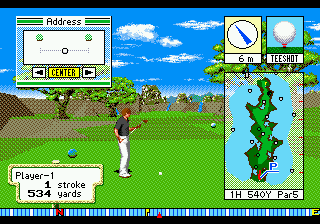
Gameplay follows the standard golf simulation formula: you select a club, line up your shot using a power meter or timing system, and try to sink the ball with as few strokes as possible. The "3D" in the name refers to a top-down or isometric view of the course, giving a sense of depth and elevation changes. You play through a series of holes, each with hazards like bunkers, water, or rough terrain. The core loop involves reading the course layout, adjusting for wind, and executing precise swings.
For retro golf fans, this title is worth a look as a piece of Sega's import library, especially if you enjoy period-accurate physics and challenging course design. It doesn't push the hardware as far as big-name western golf games, but its Japanese-exclusive status makes it a curiosity. If you're collecting rare Genesis sports games, it's a neat find. Just be ready for menus in Japanese and a steep difficulty curve on the harder courses.
GAME INFO
- Platform
- SEGA Genesis
- Genre
- Sports
- Region
- Japan
How to play New 3D Golf Simulation Devil's Course online
Getting started in New 3D Golf Simulation Devil's Course is straightforward once you understand the control layout. Since this is a Japanese-only title, the menus are in Japanese, but the golf mechanics are universal. When you boot the game, you'll likely see a title screen followed by a mode select. Look for options like "Game Start" or character select by pressing the A button (X key). The D-Pad moves a cursor.
The core loop is simple: pick a club (usually displayed at the bottom of the screen), aim using the D-Pad, then set power with a button press (likely timing a bar). A second press swings the club. Wind direction and elevation are shown on screen. You play through 18 holes, trying to get the lowest score. If you get stuck, try pressing the Select or Start buttons to access a pause menu with options like course map or quit.
Because the game is in Japanese, you might need to guess your way through a few menu screens. The first course is likely an easier one to learn the basics. Watch the power meter fill and release at the right moment. The "Devil's Course" name suggests later courses are very tough, so expect lots of bunkers and water hazards. Stick with it, and you'll get the hang of the rhythm.
CONTROLS
Controls
- Arrow Keys: D-Pad / Movement
- X: A button
- S: B button
- Z: C button
- A: X button (6-button pad)
- Q: Y button (6-button pad)
- E: Z button (6-button pad)
- Enter: Start / Mode
New 3D Golf Simulation Devil's Course FAQ
Who developed New 3D Golf Simulation Devil's Course?
The development studio behind this game is not widely documented. It was likely a smaller Japanese company, but no specific name is consistently attached to it.
Is New 3D Golf Simulation Devil's Course exclusive to SEGA Genesis or did it appear on other systems?
As far as known records show, it was released only for the SEGA Genesis (Mega Drive) in Japan. No ports to other platforms have been confirmed.
What type of game is New 3D Golf Simulation Devil's Course?
It is a sports simulation focused on golf. The game emphasizes realistic course layouts, club selection, and timing-based swing mechanics rather than arcade action.
You may also like
All SEGA Genesis games











GAME INFO
- Platform
- SEGA Genesis
- Genre
- Sports
- Region
- Japan
COMMENTS (0)
No comments yet. Be the first to share your thoughts.