The game loads when you press Play · press “Play Now” inside the game if it asks.
NBA Action '95 Starring David Robinson (USA, Europe)
NBA Action '95 Starring David Robinson
NBA Action '95 Starring David Robinson on Genesis
- SEGA Genesis
- Sports
- 5· 0 votes
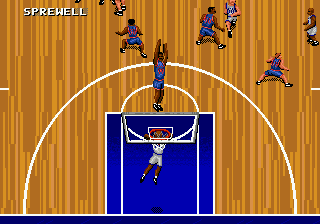
NBA Action '95 Starring David Robinson is a basketball simulation game released for the SEGA Genesis in 1994. It's part of the NBA Action series developed by Sega, specifically designed to capture the arcade feel of basketball with a real NBA license. The cover features San Antonio Spurs star David Robinson, who was a major draw for fans of the sport during that era.
The player picks a team from the actual 1994-95 NBA roster and plays through full games with quarters, fouls, and timeouts. Gameplay is fast-paced with simple controls for shooting, passing, and stealing. You can play solo against the AI or with a friend in head-to-head mode. The game emphasizes quick transitions and scoring, keeping the action moving without too much simulation depth.
For retro gaming fans, NBA Action '95 holds up as a fun, straightforward basketball title from the 16-bit era. It doesn't have the complexity of modern sports games, but its pick-up-and-play nature makes it easy to enjoy a quick match today. If you grew up with Genesis sports games or want a taste of mid-90s NBA gaming, this is worth a look.
GAME INFO
- Platform
- SEGA Genesis
- Genre
- Sports
- Released
- 1994
- Players
- 1-2
- Region
- USA, Europe
How to play NBA Action '95 Starring David Robinson online
Start by selecting a team from the available NBA rosters. The game offers exhibition matches where you choose your side and opponent. Once the game begins, use the D-Pad to move your player, the A button to jump for rebounds or blocks, and the B button to pass or shoot depending on context. The core loop is playing four quarters of basketball - score more points than the opponent to win. A quick tip: keep an eye on the shot clock and use the turbo (hold B while running) to get past defenders. There's also a simple play-calling feature if you press the Y button, but the game works fine with basic controls.
CONTROLS
Controls
- Arrow Keys: D-Pad / Movement
- X: A button
- S: B button
- Z: C button
- A: X button (6-button pad)
- Q: Y button (6-button pad)
- E: Z button (6-button pad)
- Enter: Start / Mode
NBA Action '95 Starring David Robinson FAQ
What type of game is NBA Action '95 Starring David Robinson?
It's a basketball sports simulation for the SEGA Genesis. You control NBA teams in arcade-style matches with real player names and team rosters.
Is NBA Action '95 Starring David Robinson exclusive to SEGA Genesis or did it appear on other systems?
It was released for the SEGA Genesis in the USA and Europe. There may have been versions for other platforms, but the full list is not widely documented.
Who developed NBA Action '95 Starring David Robinson?
Sega developed this game as part of their NBA Action series. The specific internal team is not widely credited outside of Sega Sports.
You may also like
All SEGA Genesis games











GAME INFO
- Platform
- SEGA Genesis
- Genre
- Sports
- Released
- 1994
- Players
- 1-2
- Region
- USA, Europe
COMMENTS (0)
No comments yet. Be the first to share your thoughts.