The game loads when you press Play · press “Play Now” inside the game if it asks.
Mutant League Hockey (USA, Europe)
Mutant League Hockey
Getting to Know Mutant League Hockey
- SEGA Genesis
- Sports
- 5· 0 votes
GAME INFO
- Platform
- SEGA Genesis
- Genre
- Sports
- Publisher
- Electronic Arts
- Developer
- Electronic Arts
- Released
- 1994
- Region
- USA, Europe
How to play Mutant League Hockey online
Getting Started
When you first boot Mutant League Hockey, you'll be greeted by a title screen and a brief menu. Use the D-Pad to navigate and press X to confirm your selection. You can choose between exhibition matches, a playoff mode, or practice if available. There's no deep story here - just pick your team of mutant monsters and hit the ice.
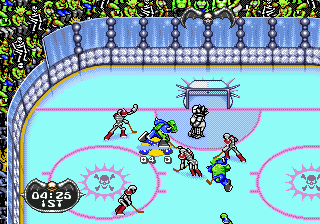
The core loop is fast and chaotic. You skate around with Arrow Keys, pass and shoot with the B button (S), and use the A button (X) for jumping or body checking. Fighting is a big part of the game; when you're close to an opponent, pressing B can trigger punches or stick swings. The puck follows simple physics, and goals are scored by shooting into the net. Winning matters, but so does surviving - expect to see bones break and over-the-top injuries after big hits.
New players should know that the game doesn't have complex rule enforcement. Icing and offside are nonexistent, so feel free to chase the puck everywhere. Special power-ups occasionally appear on the rink; collecting them can heal your goalie or temporarily supercharge your team. If you've played Mutant League Football, this will feel familiar but faster and more chaotic. Adjust to the loose skating physics and focus on staying aggressive rather than playing traditional hockey strategy.
CONTROLS
Controls
- Arrow Keys: D-Pad / Movement
- X: A button
- S: B button
- Z: C button
- A: X button (6-button pad)
- Q: Y button (6-button pad)
- E: Z button (6-button pad)
- Enter: Start / Mode
Mutant League Hockey FAQ
What type of game is Mutant League Hockey?
It is an arcade-style combat hockey game that blends traditional ice hockey with cartoonish violence and power-ups. The focus is on fast-paced, no-rules gameplay where fighting and scoring go hand in hand.
Is Mutant League Hockey exclusive to SEGA Genesis or did it appear on other systems?
This title was released solely for the Sega Genesis / Mega Drive. It never received ports to other consoles or computers during its original run.
Is there anything iconic or memorable about Mutant League Hockey?
The game is remembered for its over-the-top violence, mutated characters like Bones Jackson and Mo Puke, and the way it satirizes conventional sports presentations. Its irreverent humor and chaotic multiplayer make it a cult favorite among retro sports fans.
You may also like
All SEGA Genesis games











GAME INFO
- Platform
- SEGA Genesis
- Genre
- Sports
- Publisher
- Electronic Arts
- Developer
- Electronic Arts
- Released
- 1994
- Region
- USA, Europe
COMMENTS (0)
No comments yet. Be the first to share your thoughts.