The game loads when you press Play · press “Play Now” inside the game if it asks.
Miracle Piano Teaching System (USA)
Miracle Piano Teaching System
Miracle Piano Teaching System: Genesis Educational
- SEGA Genesis
- Educational
- 5· 0 votes
GAME INFO
- Platform
- SEGA Genesis
- Genre
- Educational
- Publisher
- Mindscape
- Developer
- Mindscape
- Released
- 1990
- Region
- USA
How to play Miracle Piano Teaching System online
Getting started with Miracle Piano Teaching System is straightforward if you have the correct hardware. The game expects you to plug in the Miracle Piano keyboard peripheral into the Genesis controller port 2. Without this keyboard, the software cannot function as intended, as all input comes from the piano keys rather than the standard controller. In an emulator environment, you may need to configure virtual input or skip this title entirely if you lack the proper equipment.
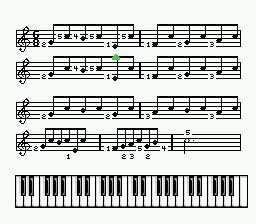
Once the keyboard is connected, you progress through a series of lessons that teach music theory, note reading, and finger placement. The screen displays sheet music and a virtual keyboard, highlighting which keys to press. The core loop involves listening to a short example, then playing the same notes on your keyboard. The software tracks your accuracy and speed, advancing you to harder exercises as you improve. There is no combative or exploratory gameplay; the entire experience is centered on piano instruction.
New players should start with the beginner lessons, which assume no prior musical knowledge. The interface is menu-driven and uses on-screen prompts to guide you through each lesson. Since this is a USA release, all menus and text are in English. The software does not include any game-like rewards or story; it is purely a teaching tool. Patience and repetition are key to making progress, much like a real music lesson.
CONTROLS
Controls
- Arrow Keys: D-Pad / Movement
- X: A button
- S: B button
- Z: C button
- A: X button (6-button pad)
- Q: Y button (6-button pad)
- E: Z button (6-button pad)
- Enter: Start / Mode
Miracle Piano Teaching System FAQ
Who developed Miracle Piano Teaching System?
The information on the specific developer of the Genesis version is not widely documented. The original Miracle Piano Teaching System for computers and NES was created by The Software Toolworks, but it is unclear if the same team handled the Genesis port.
Can players save progress in Miracle Piano Teaching System?
The game likely saves progress through a password system or on a memory card, but exact details are not well documented. It is known that the software tracks lesson completion and scores.
Is Miracle Piano Teaching System considered easy to pick up or challenging?
It is designed as a beginner-friendly educational tool, so the early lessons are very approachable. Later lessons introduce more complex rhythms and chords, which can be challenging for those without prior music experience.
You may also like
All SEGA Genesis games











GAME INFO
- Platform
- SEGA Genesis
- Genre
- Educational
- Publisher
- Mindscape
- Developer
- Mindscape
- Released
- 1990
- Region
- USA
COMMENTS (0)
No comments yet. Be the first to share your thoughts.