The game loads when you press Play · press “Play Now” inside the game if it asks.
Midway Presents Arcade's Greatest Hits (Europe)
Midway Presents Arcade's Greatest Hits
What is Midway Presents Arcade's Greatest Hits?
- SEGA Genesis
- Arcade
- Compilation
- 5· 0 votes
GAME INFO
- Platform
- SEGA Genesis
- Genre
- Arcade
- Released
- 1994
- Players
- 1-2
- Region
- Europe
How to play Midway Presents Arcade's Greatest Hits online
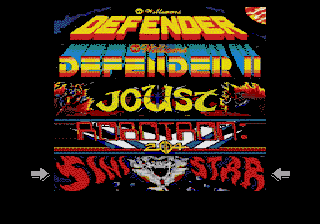
After the title screen you'll be presented with a menu listing the six arcade games included. Use the D-Pad to highlight a title and press Enter (Start) to launch it. Each game has its own controls and objectives - for example, in Defender you pilot a ship rescuing astronauts, while in Joust you ride an ostrich and joust against enemies. The A button (X on keyboard) typically confirms selections or performs the primary action like jumping or firing, while the B button (S on keyboard) does a secondary action like starting or pausing. There's no overarching story or progression between games; you simply pick one and play.
The core loop in each game is the same as the original arcade cabinet: survive as long as possible, defeat enemies, and chase a high score. Pay attention to the on-screen instructions or the manual summary if you're unfamiliar with a particular title. Some games like Robotron: 2084 require fast reflexes using both joysticks, which is mapped to the D-Pad and face buttons - take a moment to adjust. If you die, you can use the Select button (V) to insert a virtual coin and continue, depending on the game's settings. The compilation doesn't add any new modes or training - it's pure arcade action, warts and all.
CONTROLS
Controls
- Arrow Keys: D-Pad / Movement
- X: A button
- S: B button
- Z: C button
- A: X button (6-button pad)
- Q: Y button (6-button pad)
- E: Z button (6-button pad)
- Enter: Start / Mode
Midway Presents Arcade's Greatest Hits FAQ
What makes Midway Presents Arcade's Greatest Hits stand out among SEGA Genesis titles of its era?
It bundles six genuine arcade ports from Williams' golden age, offering a direct taste of early 80s coin-op classics like Defender and Robotron. While other Genesis compilations existed, this one focuses entirely on Williams' library with conversions that stay remarkably true to the originals.
Which regions was Midway Presents Arcade's Greatest Hits released in?
The game saw releases in North America and Europe. The European version carries the 'Europe' subtitle on the title screen and packaging, but the content is identical to the US cart.
Is Midway Presents Arcade's Greatest Hits considered easy to pick up or challenging?
The included games span a wide range of difficulty - Joust is relatively forgiving to start, while Robotron: 2084 demands split-second reactions. Overall, newcomers can jump into simple shooters and platformers, but mastering the tougher titles takes serious practice.
You may also like
All SEGA Genesis games











GAME INFO
- Platform
- SEGA Genesis
- Genre
- Arcade
- Released
- 1994
- Players
- 1-2
- Region
- Europe
COMMENTS (0)
No comments yet. Be the first to share your thoughts.