The game loads when you press Play · press “Play Now” inside the game if it asks.
Mega Q*bert
Mega Q*bert
Mega Q*bert: Genesis Action
- SEGA Genesis
- Action
- Homebrew
- 5· 0 votes
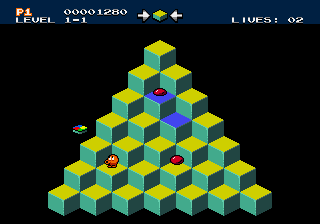
Mega Q*bert is a homebrew port of the classic arcade game Q*bert, released for the SEGA Genesis in 2019 by developer bazil. This is not an official title - it was built by a single creator and distributed through ROM-hosting sites. It faithfully recreates the arcade original's puzzle-action gameplay, targeting retro fans who want a nostalgic experience on 16-bit hardware.
Your goal is to hop onto a pyramid of cubes, changing each cube's color by landing on it. The core loop involves clearing all cubes while avoiding enemies like Coily the snake and other hazards that appear. You control Q*bert with the D-Pad to jump diagonally between cubes, and the A button to jump or confirm. The game ramps up difficulty as more enemies and faster movement keep you on your toes.
For Genesis collectors or Q*bert enthusiasts, this homebrew is a solid way to enjoy the classic formula without needing an arcade cabinet or emulating the original. It's a niche release that does exactly what it sets out to do - no extra frills, just faithful cube-hopping action. If you have fond memories of the arcade version, this port will feel instantly familiar, though it's not a must-play for everyone due to its simple, repetitive nature.
GAME INFO
- Platform
- SEGA Genesis
- Genre
- Action
- Players
- 1
- Version
- 1.0
- Based on
- Q*bert
- Made by
- bazil
How to play Mega Q*bert online
To start the game, press Enter to open the menu, then use the D-Pad to select an option and press X to confirm. Once in the game, your objective is to change the color of every cube on the pyramid by landing on them. Each jump moves Q*bert diagonally to an adjacent cube; plan your path to cover all cubes while avoiding the enemies that spawn.
The core loop is straightforward: change the cubes' colors, watch out for threats, and complete each level before time runs out or you lose all lives. Enemies like Coily the snake will chase you, but you can sometimes evade them by jumping onto the edge cubes or using floating disks that appear periodically. The game is entirely in English, so menus pose no language barrier.
CONTROLS
Controls
- Arrow Keys: D-Pad / Movement
- X: A button
- S: B button
- Z: C button
- A: X button (6-button pad)
- Q: Y button (6-button pad)
- E: Z button (6-button pad)
- Enter: Start / Mode
Mega Q*bert FAQ
Is Mega Q*bert considered easy to pick up or challenging?
The game is simple to understand - hop on cubes to change their color - but quickly becomes difficult due to increasing enemy speed and level complexity. It offers a fair challenge for arcade veterans but may frustrate newcomers after the first few stages.
What makes Mega Q*bert stand out among SEGA Genesis titles of its era?
As a homebrew, it directly ports the original Q*bert arcade game to the Genesis, which never received an official Q*bert release. This gives retro fans a way to play the classic on Sega's 16-bit hardware with no licensing hurdles.
Does Mega Q*bert have a multiplayer or co-op mode?
No, the game is strictly single-player, just like the original arcade Q*bert. There is no option for cooperative or competitive play.
You may also like
All SEGA Genesis games











GAME INFO
- Platform
- SEGA Genesis
- Genre
- Action
- Players
- 1
- Version
- 1.0
- Based on
- Q*bert
- Made by
- bazil
COMMENTS (0)
No comments yet. Be the first to share your thoughts.