The game loads when you press Play · press “Play Now” inside the game if it asks.
Mega Games 6 Vol. 1 (Europe)
Mega Games 6 Vol. 1
Getting to Know Mega Games 6 Vol. 1
- SEGA Genesis
- Action
- Compilation
- 5· 0 votes
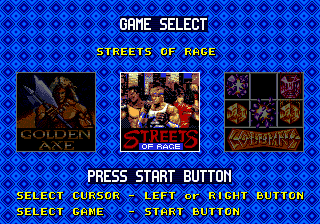
Inside the cartridge, the player is presented with a menu screen where they can select any of the six included games. Each game retains its original mechanics and control scheme, so you jump straight into the action of whichever title you pick. There are no save states or persistent progress; each game resets when you return to the menu. The gameplay experience depends entirely on which game you choose - some might be fast platformers, while others could be puzzle games or shooters. Expect the variety that defined the Genesis library at its peak.
For retro enthusiasts, Mega Games 6 Vol. 1 is a snapshot of Sega's European marketing strategy. It's not a single cohesive title but a sampler that lets you feel the breadth of the console. If you enjoy classic Genesis games and want a quick taste of different styles without hunting down individual cartridges, this compilation delivers. Just keep in mind that the quality varies across the included titles, and some games may feel dated. It's a neat piece of regional release history rather than a must-have masterpiece.
GAME INFO
- Platform
- SEGA Genesis
- Genre
- Action
- Region
- Europe
How to play Mega Games 6 Vol. 1 online
Getting Started
When the game loads, you'll see a title screen for Mega Games 6 Vol. 1. Press Start to enter a menu listing the six included games. Use the Arrow Keys to highlight your choice and press the A button (X key) to select it. Each game boots individually, so you're essentially playing each title from its own start screen.
Once inside a game, the controls match the original release. For most Sega Genesis games, the D-Pad moves your character, the A button is your primary action (often jump), and the B button (S key) handles secondary actions like attacking or confirming. If a game has its own configuration, refer to its specific manual - but the default EmulatorJS mapping covers the standard Genesis layout.
Since this is a compilation, there's no persistent save or progression between games. You can swap to a different title at any time by pressing the Select (V key) to return to the menu or resetting the emulator. If you get stuck in a difficult game, simply switch to another one. It's a grab-bag experience that encourages variety.
CONTROLS
Controls
- Arrow Keys: D-Pad / Movement
- X: A button
- S: B button
- Z: C button
- A: X button (6-button pad)
- Q: Y button (6-button pad)
- E: Z button (6-button pad)
- Enter: Start / Mode
Mega Games 6 Vol. 1 FAQ
What type of game is Mega Games 6 Vol. 1?
A compilation cartridge for the Sega Genesis that packages six distinct titles into one cartridge. It was sold in Europe as a budget-friendly way to own multiple games without buying individual cartridges. The specific lineup varies between volumes and sources.
Is Mega Games 6 Vol. 1 considered easy to pick up or challenging?
Difficulty depends entirely on which of the six games you choose. Some may be straightforward arcade-style challenges, while others could be more demanding. The compilation lets you jump between titles if one proves too tough.
Is there anything iconic or memorable about Mega Games 6 Vol. 1?
It represents a typical European release strategy from Sega in the mid-1990s, offering a bundle of older or smaller titles to refresh the Genesis catalog. While not a standout rarity, it captures the ethos of affordable, multi-game cartridges.
You may also like
All SEGA Genesis games











GAME INFO
- Platform
- SEGA Genesis
- Genre
- Action
- Region
- Europe
COMMENTS (0)
No comments yet. Be the first to share your thoughts.