CHOOSE A VERSION
4 versions · same consoleChoose an original release, regional version, revision, bootleg or clearly labelled ROM hack/mod, then press Play. Hacks may change the gameplay. Switching versions restarts the player.
Selected: Default · USA · USA
The game loads when you press Play · press “Play Now” inside the game if it asks.
McDonald's Treasure Land Adventure (USA)
McDonald's Treasure Land Adventure
Inside McDonald's Treasure Land Adventure
- SEGA Genesis
- Platformer
- 5· 0 votes
GAME INFO
- Platform
- SEGA Genesis
- Genre
- Platformer
- Developer
- Treasure
- Released
- 1993
- Players
- 1
- Region
- USA
How to play McDonald's Treasure Land Adventure online
Getting Started
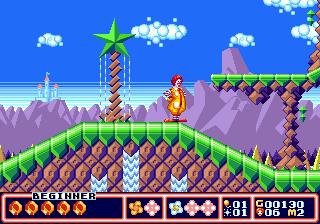
When you start a new game, you are dropped into the first stage with Ronald McDonald. Your goal is simple: collect all the treasure map pieces scattered across each level. The game is a traditional 2D platformer where you run, jump on enemies to defeat them, and occasionally use a special attack (by pressing B while holding down or something similar). The core loop is moving from left to right, defeating foes, grabbing coins and power-ups, and finding hidden areas that contain the map pieces.
Each world has a different theme - a forest, a cave, a castle, etc. - and ends with a boss fight. You have a health bar that depletes when enemies hit you; you can refill it by collecting hamburger icons. Dying sends you back to the start of the current area, but you can continue from the beginning of the world. The controls are responsive and the difficulty is moderate, so it's accessible to players of all skill levels.
Look for secrets behind rocks or in breakable walls. The map pieces are usually well-hidden, so explore every nook. Also, you can collect golden arches to earn extra lives. If you get stuck, remember that jumping on enemies is usually safer than attacking directly, and some bosses have patterns you can learn over a few tries.
CONTROLS
Controls
- Arrow Keys: D-Pad / Movement
- X: A button
- S: B button
- Z: C button
- A: X button (6-button pad)
- Q: Y button (6-button pad)
- E: Z button (6-button pad)
- Enter: Start / Mode
McDonald's Treasure Land Adventure FAQ
Is McDonald's Treasure Land Adventure exclusive to SEGA Genesis or did it appear on other systems?
It is exclusive to the Sega Genesis. No official ports were released for other consoles or computers.
In what year was McDonald's Treasure Land Adventure originally released?
The game originally came out in 1993.
Who developed McDonald's Treasure Land Adventure?
Treasure developed the game, the same studio behind Gunstar Heroes and Alien Soldier.
You may also like
All SEGA Genesis games











GAME INFO
- Platform
- SEGA Genesis
- Genre
- Platformer
- Developer
- Treasure
- Released
- 1993
- Players
- 1
- Region
- USA
COMMENTS (0)
No comments yet. Be the first to share your thoughts.