The game loads when you press Play · press “Play Now” inside the game if it asks.
Mamono Hunter Youko - Dai 7 no Keishou (Japan)
Mamono Hunter Youko - Dai 7 no Keishou
Getting to Know Mamono Hunter Youko - Dai 7 no Keishou
- SEGA Genesis
- Action
- 5· 0 votes
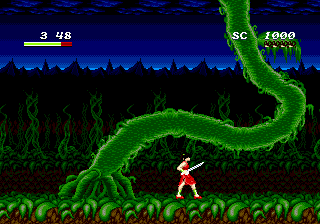
Mamono Hunter Youko - Dai 7 no Keishou is a Japanese-exclusive action game released for the SEGA Genesis, likely hitting store shelves in the early 1990s. The title translates to 'Demon Hunter Youko - The 7th Successor,' suggesting a story about a demon hunter named Youko on a quest tied to seven successors. While specific publisher and developer details are murky in Western documentation, the game fits squarely into the side-scrolling action genre popular on the platform during that era. It's a title that remained in Japan, which adds to its mystique among retro collectors and import enthusiasts.
GAME INFO
- Platform
- SEGA Genesis
- Genre
- Action
- Players
- 1
- Region
- Japan
How to play Mamono Hunter Youko - Dai 7 no Keishou online
Getting started: When you first boot up Mamono Hunter Youko, you'll be greeted by a Japanese title screen. Press Start to move to the menu, where options like 'Game Start' and 'Continue' are typically listed in kanji and katakana. Use the D-Pad to navigate and the A button (X key) to confirm your choice. If you have no save data, select the top option to begin a new game.
Once in the game, you control Youko through side-scrolling levels filled with enemies and obstacles. The core loop involves moving right, defeating monsters with your weapon (likely a sword or magic attack), and collecting items to restore health or enhance abilities. Expect standard platforming elements like jumping over pits and climbing stairs. Since menus and text are entirely in Japanese, you'll need to experiment to understand power-ups or special moves. Focus on surviving and reaching the level end - the game's difficulty is typical of early Genesis action titles.
CONTROLS
Controls
- Arrow Keys: D-Pad / Movement
- X: A button
- S: B button
- Z: C button
- A: X button (6-button pad)
- Q: Y button (6-button pad)
- E: Z button (6-button pad)
- Enter: Start / Mode
Mamono Hunter Youko - Dai 7 no Keishou FAQ
Who developed Mamono Hunter Youko - Dai 7 no Keishou?
The development studio behind this game is not widely documented in English sources. It was almost certainly a Japanese company, but specific credits remain unclear without access to original packaging or internal records.
Does Mamono Hunter Youko - Dai 7 no Keishou have a multiplayer or co-op mode?
No multiplayer or co-op mode is included. This is a single-player only action game, focusing on a lone protagonist fighting through stages.
Is Mamono Hunter Youko - Dai 7 no Keishou exclusive to SEGA Genesis or did it appear on other systems?
It appears to be exclusive to the SEGA Genesis (Mega Drive) in Japan. No known ports or releases exist for other platforms, making it a region-specific title.
You may also like
All SEGA Genesis games











GAME INFO
- Platform
- SEGA Genesis
- Genre
- Action
- Players
- 1
- Region
- Japan
COMMENTS (0)
No comments yet. Be the first to share your thoughts.