CHOOSE A VERSION
3 versions · same consoleChoose an original release, regional version, revision, bootleg or clearly labelled ROM hack/mod, then press Play. Hacks may change the gameplay. Switching versions restarts the player.
Selected: Default · USA · USA
The game loads when you press Play · press “Play Now” inside the game if it asks.
Lost Vikings, The (USA)
Lost Vikings, The
Inside Lost Vikings, The
- SEGA Genesis
- Puzzle
- 5· 0 votes
GAME INFO
- Platform
- SEGA Genesis
- Genre
- Puzzle
- Released
- 1993
- Players
- 1
- Region
- USA
How to play Lost Vikings, The online
Getting Started
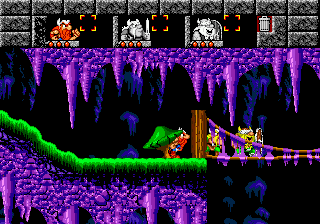
When you boot up the game, you are presented with a level selection screen (if you've earned passwords) or the start of the first area. Your job is to get all three vikings to the glowing exit door at the end of each stage. You control one viking at a time; press Q or E to swap between Olaf (shield, blocks enemies), Baleog (bow and arrow, attacks from a distance), and Erik (fast, can charge through weak walls). The key is to use their strengths in sequence - for instance, have Olaf block a fireball so Baleog can shoot a switch, then let Erik run across a collapsing bridge.
Every new area introduces fresh hazards like moving platforms, enemy turrets, and timed switches. The game is unforgiving: if any viking dies, you restart the entire level from scratch. You can find extra lives and a few power-ups (like boots for speed or helmets for invincibility) hidden in breakable blocks or dropped by enemies. Take your time to study each room's layout before moving everyone - brute force will only get you a quick trip back to the title screen. The level design gradually opens up, rewarding players who carefully coordinate the trio's unique moves.
CONTROLS
Controls
- Arrow Keys: D-Pad / Movement
- X: A button
- S: B button
- Z: C button
- A: X button (6-button pad)
- Q: Y button (6-button pad)
- E: Z button (6-button pad)
- Enter: Start / Mode
Lost Vikings, The FAQ
Who developed Lost Vikings, The?
Silicon & Synapse created the original game before they rebranded as Blizzard Entertainment. The Genesis port was handled by the same team.
Does Lost Vikings, The have a multiplayer or co-op mode?
No, this is a single-player title only. You control all three vikings individually, but there is no option for a second player to join.
Can players save progress in Lost Vikings, The?
The game uses a password system instead of battery backup. After completing certain levels, you are given a password that can be entered on the title screen to resume from that point.
You may also like
All SEGA Genesis games











GAME INFO
- Platform
- SEGA Genesis
- Genre
- Puzzle
- Released
- 1993
- Players
- 1
- Region
- USA
COMMENTS (0)
No comments yet. Be the first to share your thoughts.