The game loads when you press Play · press “Play Now” inside the game if it asks.
Long (China) (Unl)
Long
Inside Long
- SEGA Genesis
- Action
- Unlicensed
- 5· 0 votes
GAME INFO
- Platform
- SEGA Genesis
- Genre
- Action
- Players
- 1
How to play Long online
Getting Started
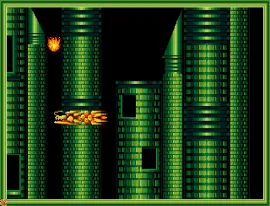
Press Start to begin the game. Use the Arrow Keys to move left or right, and press X to jump. Attack enemies by pressing S (B button) while moving toward them. The objective is straightforward: reach the end of each side-scrolling stage while avoiding hazards and defeating foes.
There is no tutorial or pause menu hints, so experiment with the controls to find which button performs special actions if any. The game follows a simple loop: move forward, fight enemies, and proceed. Dying returns you to the start of the level, so learn enemy patterns to survive.
As an unlicensed title, menus may be minimal or in Chinese. Use the D-Pad to navigate any options and confirm with X (A button). If you see a stage select screen, choose the first level to begin. The gameplay is short and repetitive, so treat it as a quick arcade-style challenge.
CONTROLS
Controls
- Arrow Keys: D-Pad / Movement
- X: A button
- S: B button
- Z: C button
- A: X button (6-button pad)
- Q: Y button (6-button pad)
- E: Z button (6-button pad)
- Enter: Start / Mode
Long FAQ
Who developed Long?
Development of Long is not widely documented. Like many unlicensed Chinese Genesis games, the original creator remains unknown.
Does Long have a multiplayer or co-op mode?
Long is a single-player only title. There is no multiplayer or co-op mode.
Roughly how long does it take to finish Long?
The game is brief, typically taking under an hour to complete. Exact times vary by skill, but most players finish in 20 to 40 minutes.
You may also like
All SEGA Genesis games











GAME INFO
- Platform
- SEGA Genesis
- Genre
- Action
- Players
- 1
COMMENTS (0)
No comments yet. Be the first to share your thoughts.