The game loads when you press Play · press “Play Now” inside the game if it asks.
Junction (Japan, USA)
Junction
Inside Junction
- SEGA Genesis
- Puzzle
- 5· 0 votes
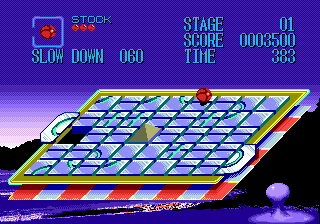
Junction is a puzzle game for the SEGA Genesis released in 1990. It was developed and published by Micronet under license from Konami. The title originally came out in Japan and later saw a US release. It's a sliding puzzle game at its core, a relatively niche genre on the console.
The player controls a ball that rolls along tracks on tile-based puzzles. The goal is to align the tracks so the ball can roll over bridged sections set at the border of each puzzle. The game offers 50 levels that can be selected in any order, but you need to accumulate a certain point total by level 50 to see the ending. It's a straightforward but challenging puzzle concept.
For fans of puzzle games, Junction offers a unique experience on the Genesis. It's not as fast-paced as action puzzlers like Columns or Puyo Puyo, but its track-alignment mechanics are distinctive. If you enjoy spatial reasoning and sliding puzzles, this is a solid pick from the early library. Just be prepared for a simple presentation and moderate difficulty curve.
GAME INFO
- Platform
- SEGA Genesis
- Genre
- Puzzle
- Publisher
- Micronet
- Developer
- Micronet
- Released
- 1990
- Players
- 1
- Region
- Japan, USA
How to play Junction online
After booting the game, you'll be presented with a level select screen. You can choose any of the 50 puzzles. Each level consists of a grid of tiles with track pieces. Your job is to rearrange the tiles to create a continuous path from the ball's start position to one of the bridged exits on the border. Use the D-Pad to highlight a tile, then press a button to slide it into an adjacent empty space.
Once you align a valid path, the ball will begin rolling automatically. If it reaches a dead end or falls off, you lose one of your lives. The goal is to clear each level and rack up points. To reach the ending, you need a certain number of points by level 50. Levels can be replayed to improve your score. There is no time limit, so you can take your time planning moves.
CONTROLS
Controls
- Arrow Keys: D-Pad / Movement
- X: A button
- S: B button
- Z: C button
- A: X button (6-button pad)
- Q: Y button (6-button pad)
- E: Z button (6-button pad)
- Enter: Start / Mode
Junction FAQ
Who developed Junction?
Developed by Micronet under license from Konami. The studio handled both development and publishing duties for this Genesis puzzle title.
Is Junction exclusive to SEGA Genesis or did it appear on other systems?
Junction appeared only on the SEGA Genesis. There is no record of releases for other consoles or home computers.
Does Junction have a multiplayer or co-op mode?
Junction is a single-player puzzle game. There are no cooperative or versus modes included.
You may also like
All SEGA Genesis games











GAME INFO
- Platform
- SEGA Genesis
- Genre
- Puzzle
- Publisher
- Micronet
- Developer
- Micronet
- Released
- 1990
- Players
- 1
- Region
- Japan, USA
COMMENTS (0)
No comments yet. Be the first to share your thoughts.