The game loads when you press Play · press “Play Now” inside the game if it asks.
Hurricanes (Europe)
Hurricanes
What is Hurricanes?
- SEGA Genesis
- Sports
- 5· 0 votes
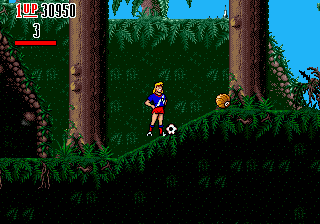
Hurricanes is a soccer game for the SEGA Genesis, released in Europe during the 16-bit era. It is based on the British animated television series about a youth soccer team. The game brings the characters and settings of the show onto the console, offering a licensed sports experience that was a novelty for fans of the cartoon.
Players control a team of cartoon characters in standard soccer matches. The gameplay is similar to many sports titles of the time, with a top-down view of the field. Each match involves passing, shooting, and tackling to score goals. The controls are straightforward, with buttons for kicking and passing. Special moves or character abilities may be present, but the core is grounded in arcade-style soccer.
For fans of the show, this is a charming piece of licensed memorabilia. It may not compete with the big-name soccer sims of the era, but it has its own personality with recognizable characters and colorful graphics. It is worth a quick play for retro enthusiasts curious about obscure TV tie-ins. As a European exclusive, it has a niche appeal.
GAME INFO
- Platform
- SEGA Genesis
- Genre
- Sports
- Publisher
- U.S. Gold
- Developer
- Acclaim Studios London
- Released
- 1994
- Players
- 1-2
- Region
- Europe
How to play Hurricanes online
First, choose your team from the available clubs. You can select a quick match or a tournament mode. The controls are simple: use the D-Pad to move your player on the field. The A button is used for shooting or passing, while the B button can be used for tackling.
The goal is to score more goals than the opponent within the time limit. Pay attention to the power bar when shooting to control the strength of the kick. The game follows standard soccer rules with throw-ins, goal kicks, and corners.
If you are playing alone, you will face the computer. For two-player matches, each player uses a separate keyboard or a controller. The menus are in English, so navigation is straightforward.
CONTROLS
Controls
- Arrow Keys: D-Pad / Movement
- X: A button
- S: B button
- Z: C button
- A: X button (6-button pad)
- Q: Y button (6-button pad)
- E: Z button (6-button pad)
- Enter: Start / Mode
Hurricanes FAQ
Is there anything iconic or memorable about Hurricanes?
It is based on the animated series Hurricanes, which had a brief run in the UK. The game features characters like the team captain and other members, though the gameplay is standard soccer.
Is Hurricanes exclusive to SEGA Genesis or did it appear on other systems?
It also appeared on the Commodore Amiga and maybe the Atari ST, though the Genesis version is the most common retro cartridge. The exact platform list is not widely documented.
Does Hurricanes have a multiplayer or co-op mode?
Yes, two players can face each other in a head-to-head match. There is no cooperative mode against the computer.
You may also like
All SEGA Genesis games











GAME INFO
- Platform
- SEGA Genesis
- Genre
- Sports
- Publisher
- U.S. Gold
- Developer
- Acclaim Studios London
- Released
- 1994
- Players
- 1-2
- Region
- Europe
COMMENTS (0)
No comments yet. Be the first to share your thoughts.