The game loads when you press Play · press “Play Now” inside the game if it asks.
Hard Drivin' (World)
Hard Drivin'
What is Hard Drivin'?
- SEGA Genesis
- Racing
- 5· 0 votes
Hard Drivin' on SEGA Genesis is a home port of Atari's groundbreaking polygonal arcade racer. Released worldwide in the early 1990s, this version brought the arcade's 3D graphics and physics to home consoles. The exact developer and publisher are not widely documented, but the game is known as a direct conversion of the arcade original.
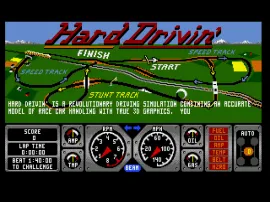
Players take control of a high-performance sports car and race against the clock on a closed circuit. The track features hills, dips, loops, and stunt obstacles that challenge your reflexes. You must accelerate, brake, steer, and shift gears (with the optional manual transmission) to keep the car on the road. Crashing resets you to the last checkpoint, and you have to complete each lap within a strict time limit.
This title is worth checking out for its historical significance as one of the earliest 3D racing experiences on the Genesis. The polygon graphics were impressive for the era, though they look primitive today. It lacks the polish of later racers but offers a unique challenge for retro enthusiasts interested in the evolution of driving games.
GAME INFO
- Platform
- SEGA Genesis
- Genre
- Racing
- Publisher
- Atari Games
- Developer
- Atari Games
- Released
- 1989
- Players
- 1
How to play Hard Drivin' online
To get started, press Enter to begin. You are placed on the starting line of a race track. The core objective is to complete laps before the timer runs out. Use the Arrow Keys to steer your car. Press X to accelerate (hold it down) and S to brake. You can shift gears manually by using the A and X buttons? In this port, gear shifting is automatic by default, but you can toggle manual mode from the options menu.
Pay close attention to the track layout - hills and blind crests mean you need to anticipate turns and dips. If you crash into a wall or flip over, your car is reset to the last checkpoint with a small time penalty. The game is unforgiving; mastering the turns and consistent speed is key to beating the clock. There is no continue after running out of time, so practice and memorize the circuit.
CONTROLS
Controls
- Arrow Keys: D-Pad / Movement
- X: A button
- S: B button
- Z: C button
- A: X button (6-button pad)
- Q: Y button (6-button pad)
- E: Z button (6-button pad)
- Enter: Start / Mode
Hard Drivin' FAQ
Who developed Hard Drivin'?
The original arcade game was created by Atari Games. The SEGA Genesis port was handled by a separate development team, but the exact studio is not widely documented.
Does Hard Drivin' have a multiplayer or co-op mode?
No. This is a single-player racing experience only. There is no split-screen or cooperative mode.
What makes Hard Drivin' stand out among SEGA Genesis titles of its era?
It was one of the first console racing games to use polygonal 3D graphics, giving it a distinct look compared to sprite-based racers. The physics and track design also offered a realistic challenge unusual for its time.
You may also like
All SEGA Genesis games











GAME INFO
- Platform
- SEGA Genesis
- Genre
- Racing
- Publisher
- Atari Games
- Developer
- Atari Games
- Released
- 1989
- Players
- 1
COMMENTS (0)
No comments yet. Be the first to share your thoughts.