The game loads when you press Play · press “Play Now” inside the game if it asks.
Giant Jungle
Giant Jungle
Giant Jungle: Genesis Platformer
- SEGA Genesis
- Platformer
- Homebrew
- 5· 0 votes
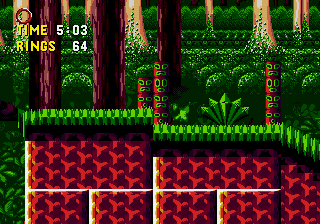
Giant Jungle is a homebrew platformer created for the SEGA Hacking Contest 2024, appearing on the SEGA Genesis. It was developed by an unknown creator specifically for this contest, meaning it is not an official commercial release. The game is a relatively recent addition to the Genesis library, built within the constraints of the original hardware for a modern competition.
You control a character through a series of jungle-themed levels. The core gameplay involves running, jumping, and avoiding hazards while progressing from left to right. Based on the contest format, it likely includes elements common to classic platformers, such as enemies to avoid or defeat and collectibles to gather. The exact number of levels or specific power-ups is not widely documented, but the focus is on straightforward platforming action.
Giant Jungle is worth a look for fans of homebrew Genesis games and those interested in the output of the SEGA Hacking Contest. It is a simple, niche title that captures the spirit of the platform's era without overcomplicating things. If you enjoy discovering unofficial projects that push the original console, this is a solid curiosity, but it is not a polished commercial experience.
GAME INFO
- Platform
- SEGA Genesis
- Genre
- Platformer
How to play Giant Jungle online
When you start Giant Jungle, the game will likely present a title screen. Press Enter to begin. You control your character using the D-Pad to move left or right. Use the A button (X key) to jump over pits and obstacles. The B button (S key) may be used to attack or interact with enemies, though specific enemy behaviors are not well documented. The goal appears to be reaching the end of each level while avoiding dangers. There is no known save feature, so expect to play through in one sitting. If menus are in English, navigation is straightforward; if Japanese, trial and error with V (Select) and Enter (Start) may be needed. The game is a typical Genesis platformer, so practice your timing and movement.
CONTROLS
Controls
- Arrow Keys: D-Pad / Movement
- X: A button
- S: B button
- Z: C button
- A: X button (6-button pad)
- Q: Y button (6-button pad)
- E: Z button (6-button pad)
- Enter: Start / Mode
Giant Jungle FAQ
Is there anything iconic or memorable about Giant Jungle?
Giant Jungle is primarily notable for being a contest entry in the SEGA Hacking Contest 2024. It stands out as a modern homebrew project designed for the Genesis, but specific standout features are not widely documented.
Is Giant Jungle an official release, a fan hack, a prototype, or another kind of build?
This game is a homebrew title created for a contest, not an official commercial release or a hack of an existing game. It was built from scratch for the SEGA Hacking Contest 2024.
Is Giant Jungle exclusive to SEGA Genesis or did it appear on other systems?
Giant Jungle was made specifically for the SEGA Genesis as part of the contest. There is no evidence it appeared on other platforms.
You may also like
All SEGA Genesis games











GAME INFO
- Platform
- SEGA Genesis
- Genre
- Platformer
COMMENTS (0)
No comments yet. Be the first to share your thoughts.