The game loads when you press Play · press “Play Now” inside the game if it asks.
FZ Senki Axis ~ Final Zone (Japan, USA)
FZ Senki Axis ~ Final Zone
FZ Senki Axis ~ Final Zone Overview
- SEGA Genesis
- Run and Gun
- 5· 0 votes
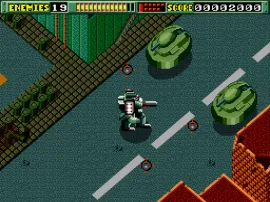
You move through horizontally scrolling stages, shooting at enemies while using a jetpack to jump and fly over obstacles. The core gameplay involves blasting aliens, collecting power-ups for your weapon, and avoiding environmental hazards. Each level ends with a boss fight that tests your reflexes and aim. The game demands quick movement and constant shooting, typical of the run-and-gun genre popular on the Genesis.
Today, FZ Senki Axis ~ Final Zone stands as a solid example of early Genesis shooters. It may not be as polished as later titles, but its straightforward action and retro charm make it worth a play for fans of the genre. The game captures the feel of 16-bit arcade-style shooting, with no complex story to distract from the gameplay. If you enjoy no-frills run-and-gun action, this one is worth checking out.
GAME INFO
- Platform
- SEGA Genesis
- Genre
- Run and Gun
- Players
- 1
- Region
- Japan, USA
How to play FZ Senki Axis ~ Final Zone online
Getting Started
When you start the game, you will likely see a title screen. Press Start to proceed. If the game is in Japanese, the menu options are still navigable by pressing Start to begin and using the D-pad to make selections, though you may need to experiment. The goal is to move through each stage from left to right, shooting all alien enemies in your path. Use the jump (X) to avoid ground-based attacks and to reach higher platforms. The jetpack allows brief flight, but be careful not to overuse it.
The core loop is simple: move forward, shoot everything, collect weapon power-ups (like spread shots or lasers) dropped by enemies, and reach the end-of-level boss. Each boss has a pattern you must learn to defeat. Dying will cost you a life, but you have a limited number of continues. Memorizing level layouts and enemy placements is key to progressing. After beating a boss, you may receive a password to continue later.
CONTROLS
Controls
- Arrow Keys: D-Pad / Movement
- X: A button
- S: B button
- Z: C button
- A: X button (6-button pad)
- Q: Y button (6-button pad)
- E: Z button (6-button pad)
- Enter: Start / Mode
FZ Senki Axis ~ Final Zone FAQ
Does FZ Senki Axis ~ Final Zone have a multiplayer or co-op mode?
The game is designed for single-player only. There is no two-player cooperative or versus mode included.
In what year was FZ Senki Axis ~ Final Zone originally released?
The original release year is not widely documented in standard sources. Estimates place it in the early 1990s, but exact dates vary between regions.
Can players save progress in FZ Senki Axis ~ Final Zone?
Like many Genesis games of its era, progress is saved through a password system. At the end of each level, a code is displayed that can be entered later to resume from that point.
You may also like
All SEGA Genesis games











GAME INFO
- Platform
- SEGA Genesis
- Genre
- Run and Gun
- Players
- 1
- Region
- Japan, USA
COMMENTS (0)
No comments yet. Be the first to share your thoughts.