The game loads when you press Play · press “Play Now” inside the game if it asks.
Fun Car Rally (USA) (Proto)
Fun Car Rally
Fun Car Rally - Racing Classic
- SEGA Genesis
- Racing
- Prototype
- 5· 0 votes
GAME INFO
- Platform
- SEGA Genesis
- Genre
- Racing
- Region
- USA
- Version
- Proto
How to play Fun Car Rally online
Getting Started
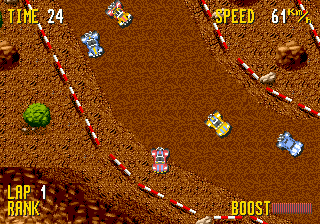
Because Fun Car Rally is an unfinished prototype, the game may lack a proper title screen or menu system. Upon loading, you might be dropped directly into a race or a car selection screen. If there is a menu, use the D-Pad to navigate and press Start or the A button to confirm. The core gameplay loop, assuming it follows standard racing genre conventions, involves picking a car and racing against time or opponents on an oval or track. Since this is a prototype, expect incomplete graphics, placeholder assets, and possibly missing sound effects.
If you manage to get into a race, the controls should respond similarly to other Genesis racing games: accelerate with the A button (D-Pad up might also work), steer left and right with the D-Pad, and brake or reverse with the B button. The prototype may not include a pause function or proper collision detection. Treat it as a historical artifact rather than a polished game; the fun comes from exploring what the developers were testing, not from winning a championship. If the game boots to a solid color screen or crashes, that is typical of early prototypes.
CONTROLS
Controls
- Arrow Keys: D-Pad / Movement
- X: A button
- S: B button
- Z: C button
- A: X button (6-button pad)
- Q: Y button (6-button pad)
- E: Z button (6-button pad)
- Enter: Start / Mode
Fun Car Rally FAQ
Which regions was Fun Car Rally released in?
This prototype is labeled as USA region, so it was intended for the North American market. No evidence exists of releases in Japan or Europe.
What makes Fun Car Rally stand out among SEGA Genesis titles of its era?
Its status as a never-released prototype makes it a rare and mysterious piece of gaming history. Most Genesis racing games were completed and published, so this build offers a behind-the-scenes look at development that few titles provide.
Is Fun Car Rally considered easy to pick up or challenging?
The prototype nature means difficulty is impossible to judge, as the game is unfinished and likely unbalanced. Early builds often lack proper tuning, so it may feel either too easy or broken depending on what code is present.
You may also like
All SEGA Genesis games











GAME INFO
- Platform
- SEGA Genesis
- Genre
- Racing
- Region
- USA
- Version
- Proto
COMMENTS (0)
No comments yet. Be the first to share your thoughts.