CHOOSE A VERSION
3 versions · same consoleChoose an original release, regional version, revision, bootleg or clearly labelled ROM hack/mod, then press Play. Hacks may change the gameplay. Switching versions restarts the player.
Selected: Default · USA · USA
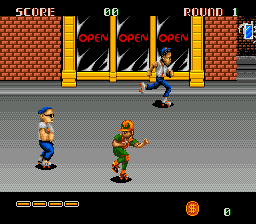
The game loads when you press Play · press “Play Now” inside the game if it asks.
DJ Boy (USA)
DJ Boy
What is DJ Boy?
- SEGA Genesis
- Beat em Up
- 5· 0 votes
GAME INFO
- Platform
- SEGA Genesis
- Genre
- Beat em Up
- Publisher
- Kaneko
- Developer
- Kaneko
- Released
- 1989
- Region
- USA
How to play DJ Boy online
CONTROLS
Controls
- Arrow Keys: D-Pad / Movement
- X: A button
- S: B button
- Z: C button
- A: X button (6-button pad)
- Q: Y button (6-button pad)
- E: Z button (6-button pad)
- Enter: Start / Mode
DJ Boy FAQ
Which regions was DJ Boy released in?
The game saw a limited release in arcades across Japan and later received a home port for the SEGA Genesis in North America. Some European territories also got the Genesis version through import channels.
Is DJ Boy exclusive to SEGA Genesis or did it appear on other systems?
DJ Boy first appeared in arcades in 1989 before being ported to the SEGA Genesis. It did not appear on any other home consoles or handhelds.
In what year was DJ Boy originally released?
The arcade version debuted in 1989. The SEGA Genesis port followed, though its exact year is not widely documented in the provided context.
You may also like
All SEGA Genesis games











GAME INFO
- Platform
- SEGA Genesis
- Genre
- Beat em Up
- Publisher
- Kaneko
- Developer
- Kaneko
- Released
- 1989
- Region
- USA
COMMENTS (0)
No comments yet. Be the first to share your thoughts.