The game loads when you press Play · press “Play Now” inside the game if it asks.
DecapAttack (USA, Europe)
DecapAttack
DecapAttack Overview
- SEGA Genesis
- Platformer
- 5· 0 votes
DecapAttack is a platformer released for the SEGA Genesis in 1991. It was developed by Vic Tokai and published by Sega. This version is a westernized adaptation of the Japanese Mega Drive game Magical Hat no Buttobi Tābo! Daibōken, getting new art, story, music, and level designs.
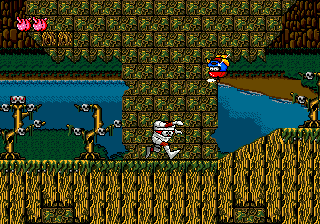
You control Chuck D. Head, a mummy-like character, as he pushes across side-scrolling stages. Your main attack is your own detachable head, which you can throw at enemies in a straight line. Jumping on foes also works. Each stage has a goal at the end, often a boss encounter. Collectible items like skulls grant points and occasionally extra lives.
Today, DecapAttack stands as a quirky example of how western publishers localized Japanese games by reskinning them entirely. It's not a deep or difficult game, but the head-throwing mechanic is memorable and the cartoon sprites have a certain charm. For retro enthusiasts, it's a fun, short play that offers a glimpse into early 90s localization practices.
GAME INFO
- Platform
- SEGA Genesis
- Genre
- Platformer
- Developer
- Tokai Communications
- Released
- 1991
- Players
- 1
- Region
- USA, Europe
How to play DecapAttack online
When you start the game, you appear at the beginning of the first stage. Move right to explore. The main goal is to reach the end of each level, usually by finding an exit or defeating a boss. Use the jump button to leap over gaps and onto platforms. Press the attack button to throw your head at enemies. You can also land on enemies to bounce off them, but watch out for certain ones that harm on contact.
Collect skulls and other items for points and occasional extra lives. Each stage has a time limit, so keep moving. If you lose all your lives, you can continue from the start of the current stage. The game is forgiving enough that most players can finish it with practice. Pay attention to boss patterns - they often require timing and patience rather than brute force.
CONTROLS
Controls
- Arrow Keys: D-Pad / Movement
- X: A button
- S: B button
- Z: C button
- A: X button (6-button pad)
- Q: Y button (6-button pad)
- E: Z button (6-button pad)
- Enter: Start / Mode
DecapAttack FAQ
Who developed DecapAttack?
Vic Tokai handled development of DecapAttack. They worked on several other Genesis titles and localized this one from the Japanese original.
Is DecapAttack considered easy to pick up or challenging?
It offers a moderate challenge typical of early 90s platformers. The controls are responsive, but some jumps and enemy patterns require a bit of practice to overcome.
Is there anything iconic or memorable about DecapAttack?
The head-throwing attack is the most iconic element, and the complete reskinning of the Japanese source material makes it a notable example of western localization in gaming history.
You may also like
All SEGA Genesis games











GAME INFO
- Platform
- SEGA Genesis
- Genre
- Platformer
- Developer
- Tokai Communications
- Released
- 1991
- Players
- 1
- Region
- USA, Europe
COMMENTS (0)
No comments yet. Be the first to share your thoughts.