The game loads when you press Play · press “Play Now” inside the game if it asks.
Dangerous Seed (Japan)
Dangerous Seed
Getting to Know Dangerous Seed
- SEGA Genesis
- Shooter
- 5· 0 votes
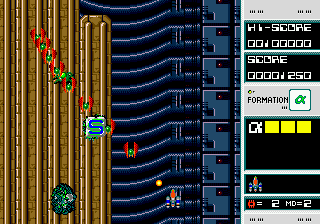
Dangerous Seed is a vertically scrolling shooter from Namco, originally an arcade title before being ported to the SEGA Mega Drive (Genesis) in Japan. It arrived during the early 90s when the console was flooded with shoot-em-ups, but Namco's pedigree gives it distinction. The game puts you in control of a spaceship fighting biomechanical insectoid enemies.
The core loop is classic vertical shoot-em-up action: you pilot your ship through waves of enemies while collecting power-ups that attach extra parts to your vessel. These additions enhance your firepower and defenses. The steady accumulation of ship parts is a unique mechanic that sets it apart from just picking up weapon upgrades. You must dodge enemy fire and defeat a boss at the end of each stage.
For fans of the genre, Dangerous Seed offers a solid challenge with distinctive visual design. The insectoid enemy theme is well executed for the platform. It's not as well known as some of Namco's other shooters, but it holds its own among Genesis shoot-em-ups. If you enjoy old-school vertical shooters, it's worth a try for the interesting ship-building mechanic and Namco polish.
GAME INFO
- Platform
- SEGA Genesis
- Genre
- Shooter
- Publisher
- Namco
- Developer
- Namco
- Released
- 1989
- Region
- Japan
How to play Dangerous Seed online
First, you'll see a Japanese title screen. Press Start to proceed. The main menu is in Japanese, but the options are straightforward: continue to game. Once in action, use the D-Pad to move and X (A button) to shoot. Your ship will begin with basic weapons.
As you destroy enemies, they drop parts that automatically attach to your ship, expanding your arsenal and hitbox. Be careful not to take damage, or you may lose these parts. The goal is to survive and defeat the boss at the end of each stage.
The core loop is simple: shoot everything, collect parts, avoid enemy fire, and progress through levels that increase in difficulty. Because menus are in Japanese, familiarizing yourself with the layout by trial and error is fine.
CONTROLS
Controls
- Arrow Keys: D-Pad / Movement
- X: A button
- S: B button
- Z: C button
- A: X button (6-button pad)
- Q: Y button (6-button pad)
- E: Z button (6-button pad)
- Enter: Start / Mode
Dangerous Seed FAQ
Who developed Dangerous Seed?
Namco developed the original arcade version and the Genesis port. Namco was known for many classic shoot-em-ups during the 1980s and 1990s.
What type of game is Dangerous Seed?
It is a vertically scrolling shoot-em-up (shooter). The player controls a spaceship and fights waves of biomechanical insectoid enemies.
Is Dangerous Seed exclusive to SEGA Genesis or did it appear on other systems?
It originally appeared in arcades in 1989 before being ported exclusively to the SEGA Mega Drive in Japan. There were no other home console releases.
You may also like
All SEGA Genesis games











GAME INFO
- Platform
- SEGA Genesis
- Genre
- Shooter
- Publisher
- Namco
- Developer
- Namco
- Released
- 1989
- Region
- Japan
COMMENTS (0)
No comments yet. Be the first to share your thoughts.