The game loads when you press Play · press “Play Now” inside the game if it asks.
Dahna Megami Tanjou (Japan)
Dahna Megami Tanjou
About Dahna Megami Tanjou
- SEGA Genesis
- RPG
- 5· 0 votes
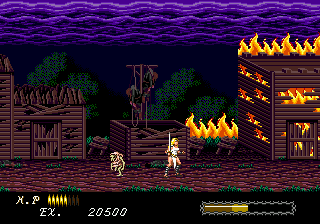
Dahna Megami Tanjou (Japan) is a turn-based role-playing game released for the Sega Genesis/Mega Drive. This title came out exclusively in Japan during the early 1990s, a time when the platform saw a wave of RPGs that never made it west. It belongs to the classic JRPG tradition, focusing on party management, exploration, and story progression through dialogue and events. As a Japan-exclusive release, it remains a somewhat obscure entry in the Genesis library, known mostly to import collectors and retro RPG fans.
Players take control of a group of characters, traveling across a fantasy world via an overworld map. The core gameplay involves navigating towns and dungeons, speaking with non-player characters to advance the plot, and engaging in random encounters with enemies. Combat is turn-based, with options to attack, use magic, defend, or use items. Characters gain experience points and level up, improving stats and learning new abilities. The player must manage resources like health points and magic points, and equip weapons and armor found in shops or treasure chests. The game's interface is entirely in Japanese, which can present a challenge for non-readers, but the genre's conventions make basic navigation manageable.
For retro RPG enthusiasts, Dahna Megami Tanjou offers a glimpse into the Genesis's Japanese software library, an area less explored compared to its Western releases. Its mechanics are standard for the genre, providing a comfortable experience for anyone familiar with early 90s JRPGs. The title is worth trying today if you enjoy the slower, text-heavy style of classic role-playing games and are willing to work around the language barrier. It sits alongside other Japan-only Genesis RPGs as a curiosity for collectors, though its gameplay does not break new ground for the era.
GAME INFO
- Platform
- SEGA Genesis
- Genre
- RPG
- Players
- 1
- Region
- Japan
How to play Dahna Megami Tanjou online
Getting Started
When you start the game, you are likely presented with a title screen and a prompt to press Start (Enter on the keyboard). The main menu is in Japanese; typical options include New Game, Continue (if save data exists), and sometimes a configuration screen. Choose the top option to begin. You will be placed in a starting location, often a town or castle. The first task is to talk to NPCs by pressing the confirm button (X) to gather story context and objectives. Since the text is in Japanese, you may need to rely on visual cues or a guide. Move your character with the D-Pad (arrow keys).
The core loop involves exploring the current area, equipping starting gear (if any), and then heading toward the next objective, usually indicated by NPC dialogue. Random battles occur as you travel on the overworld or inside dungeons. In combat, use the confirm button to select commands from a menu (again in Japanese). The B button (S key) often cancels or opens a sub-menu. Save your progress at inns or save points, which are typically highlighted or described in text. Because the game is entirely in Japanese, new players should expect to experiment with menu commands or consult a fan translation guide to understand items and skills.
CONTROLS
Controls
- Arrow Keys: D-Pad / Movement
- X: A button
- S: B button
- Z: C button
- A: X button (6-button pad)
- Q: Y button (6-button pad)
- E: Z button (6-button pad)
- Enter: Start / Mode
Dahna Megami Tanjou FAQ
Roughly how long does it take to finish Dahna Megami Tanjou?
Estimated playthrough time is around 20 to 30 hours for a typical run, depending on how much time is spent exploring and grinding. The length is comparable to many console RPGs of the early 1990s.
Is Dahna Megami Tanjou considered easy to pick up or challenging?
The game follows standard genre conventions, making it approachable for those familiar with turn-based RPGs. However, the Japanese-only text and lack of tutorials can make navigation and menu understanding difficult for non-Japanese speakers.
Who developed Dahna Megami Tanjou?
The development studio is not clearly documented in widely available sources. Some references associate the title with Telenet Japan, but this remains unconfirmed.
You may also like
All SEGA Genesis games











GAME INFO
- Platform
- SEGA Genesis
- Genre
- RPG
- Players
- 1
- Region
- Japan
COMMENTS (0)
No comments yet. Be the first to share your thoughts.