The game loads when you press Play · press “Play Now” inside the game if it asks.
Champions World Class Soccer (World) (En,Fr,De,Es)
Champions World Class Soccer
Champions World Class Soccer Overview
- SEGA Genesis
- Sports
- 5· 0 votes
GAME INFO
- Platform
- SEGA Genesis
- Genre
- Sports
- Developer
- Park Place Productions
- Released
- 1993
- Players
- 1-2
- Region
- Worldwide
How to play Champions World Class Soccer online
Getting Started
Choose a national team from the available roster and then select a tournament or exhibition match. The core gameplay involves moving your players with the D-Pad, using the B button to run or tackle, and the A button to kick or pass. Timing is key when controlling the ball; hold the B button to sprint, but be careful not to exhaust your players.
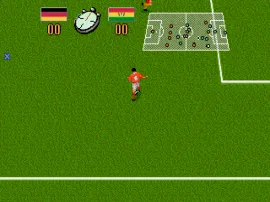
Matches play out in a standard top-down view. You control the player nearest to the ball, and pressing the A button in the direction you want to pass or shoot sends the ball that way. Defense works by chasing opponents and pressing the tackle button when close. The game supports two-player matches, so you can challenge a friend locally. There is no save feature, so all progress must be completed in one sitting.
If you are new to retro soccer games, start with a quick exhibition match to learn the controls. The AI offers a fair challenge on default difficulty, and the simple mechanics make it easy to pick up. The multi-language support means the menus are accessible regardless of the language setting you choose at the start.
CONTROLS
Controls
- Arrow Keys: D-Pad / Movement
- X: A button
- S: B button
- Z: C button
- A: X button (6-button pad)
- Q: Y button (6-button pad)
- E: Z button (6-button pad)
- Enter: Start / Mode
Champions World Class Soccer FAQ
Which regions was Champions World Class Soccer released in?
It was released in North America and Europe, as indicated by the multi-language support. The "World" label in the title suggests it was intended for a broad international audience.
Can players save progress in Champions World Class Soccer?
This cartridge-based game does not include a battery save or password feature. All matches and tournaments must be completed in a single play session.
Does Champions World Class Soccer have a multiplayer or co-op mode?
It offers a local two-player versus mode where two people can compete against each other. There is no co-op mode; players always face off as opposing teams.
You may also like
All SEGA Genesis games











GAME INFO
- Platform
- SEGA Genesis
- Genre
- Sports
- Developer
- Park Place Productions
- Released
- 1993
- Players
- 1-2
- Region
- Worldwide
COMMENTS (0)
No comments yet. Be the first to share your thoughts.