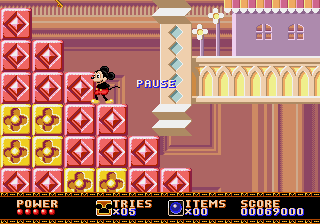
The game loads when you press Play · press “Play Now” inside the game if it asks.
Castle of Illusion - Fushigi no Oshiro Daibouken (Japan)
Castle of Illusion - Fushigi no Oshiro Daibouken
Getting to Know Castle of Illusion - Fushigi no Oshiro Daibouken
- SEGA Genesis
- Platformer
- 5· 0 votes
GAME INFO
- Platform
- SEGA Genesis
- Genre
- Platformer
- Released
- 1990
- Players
- 1
- Region
- Japan
How to play Castle of Illusion - Fushigi no Oshiro Daibouken online
Getting Started
You start at the castle gate with only basic movement and jumping. Press X to jump on enemies or collect items like gems and health bonuses. The B button lets Mickey run faster, which helps clear longer gaps or dodge hazards. Each level ends with a boss fight against one of Mizrabel's minions. Since this is the Japanese release, all menus and on-screen text are in Japanese. The main menu uses "START" for beginning the game and "OPTION" for sound test or difficulty settings - those are usually recognizable by their position. If stuck, try pressing start to skip through story text, then follow the path to the right.
The core loop is simple: move right until you find a key that opens the exit door, then reach the door to clear the stage. Look for hidden areas behind walls - many contain extra lives or bonus points. Enemies can be stunned by jumping on their heads, but some require a timed approach as they move in patterns. Your health is shown as a life bar above your head; losing all of it costs a life. Collecting 100 stars (found in stages) grants an extra life. The game auto-saves your progress after each boss, but you can also use passwords. However, since this is a Japanese ROM, the password system might be in Japanese - write down any patterns you see.
CONTROLS
Controls
- Arrow Keys: D-Pad / Movement
- X: A button
- S: B button
- Z: C button
- A: X button (6-button pad)
- Q: Y button (6-button pad)
- E: Z button (6-button pad)
- Enter: Start / Mode
Castle of Illusion - Fushigi no Oshiro Daibouken FAQ
Is Castle of Illusion - Fushigi no Oshiro Daibouken exclusive to SEGA Genesis or did it appear on other systems?
The Japanese version of Castle of Illusion was released only for the Sega Genesis/Mega Drive. However, a different game with the same Disney license appeared on Master System and Game Gear, but it is not the same title.
Does Castle of Illusion - Fushigi no Oshiro Daibouken have a multiplayer or co-op mode?
No multiplayer or co-op is available. The game is strictly a single-player experience as Mickey Mouse ventures alone through the castle.
Who developed Castle of Illusion - Fushigi no Oshiro Daibouken?
Development was handled internally by Sega, specifically by their consumer development division at the time. The game is credited to Sega with no individual studio name listed.
You may also like
All SEGA Genesis games











GAME INFO
- Platform
- SEGA Genesis
- Genre
- Platformer
- Released
- 1990
- Players
- 1
- Region
- Japan
COMMENTS (0)
No comments yet. Be the first to share your thoughts.