The game loads when you press Play · press “Play Now” inside the game if it asks.
Cadash (USA, Asia)
Cadash
Cadash: Genesis Action
- SEGA Genesis
- Action
- 5· 0 votes
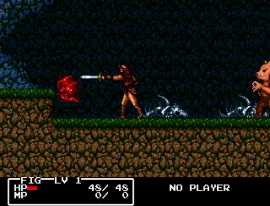
Cadash on SEGA Genesis is a side-scrolling action RPG that originally came from Taito. It was released in North America in 1991 and later in Japan the following year. This console port brought the arcade and computer classic to the 16-bit generation, offering a hybrid of platforming and role-playing elements that was still fresh at the time.
You control one of four character classes - warrior, mage, priestess, or ninja - each with their own combat style and magic. The game blends real-time combat with leveling up, finding equipment, and exploring a fantasy world. You move left to right through stages, fighting monsters and collecting gold and items, with occasional branching paths and shops where you can buy weapons and spells.
For retro fans, Cadash offers an interesting mix of platforming action and RPG progression that was uncommon on the Genesis at the time. It's not as deep as a dedicated RPG or as polished as a pure action game, but its hybrid approach has a unique charm. If you enjoy games like Wonder Boy in Monster Land or early action RPGs, this is worth checking out.
GAME INFO
- Platform
- SEGA Genesis
- Genre
- Action
- Publisher
- Taito
- Developer
- Taito
- Released
- 1991
- Players
- 1
How to play Cadash online
First, choose your character class at the title screen: warrior (strong melee), mage (magic-focused), priestess (balanced support), or ninja (fast but fragile). Each has different starting stats and spells, so pick one that matches your play style. The game then drops you into a side-scrolling stage where you fight enemies, collect gold and items, and navigate platforms.
Your health and magic are displayed at the top. Defeated enemies drop coins and sometimes health or magic refills. Spend gold at shops between stages to buy better weapons, armor, or spells. As you defeat enemies, you gain experience and level up, improving your stats. The core loop is clear stages, beat bosses, and progress through the fantasy world. There are branching paths that can lead to extra areas or shortcuts, so explore freely.
CONTROLS
Controls
- Arrow Keys: D-Pad / Movement
- X: A button
- S: B button
- Z: C button
- A: X button (6-button pad)
- Q: Y button (6-button pad)
- E: Z button (6-button pad)
- Enter: Start / Mode
Cadash FAQ
Is Cadash an official release, a fan hack, a prototype, or another kind of build?
Cadash on SEGA Genesis is an official commercial release by Taito. It is not a hack, prototype, or fan-made modification.
In what year was Cadash originally released?
Cadash first appeared in arcades in 1989, with the SEGA Genesis version arriving in 1991 in North America and 1992 in Japan.
Is Cadash exclusive to SEGA Genesis or did it appear on other systems?
Cadash appears on multiple platforms, including the arcade original, NES, PC Engine, TurboGrafx-CD, and various home computers. The Genesis version is one of several ports.
You may also like
All SEGA Genesis games











GAME INFO
- Platform
- SEGA Genesis
- Genre
- Action
- Publisher
- Taito
- Developer
- Taito
- Released
- 1991
- Players
- 1
COMMENTS (0)
No comments yet. Be the first to share your thoughts.