CHOOSE A VERSION
3 versions · same consoleChoose an original release, regional version, revision, bootleg or clearly labelled ROM hack/mod, then press Play. Hacks may change the gameplay. Switching versions restarts the player.
Selected: Default · USA · USA
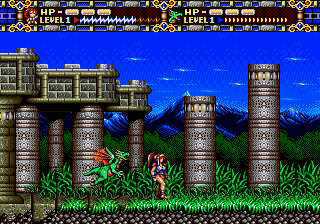
The game loads when you press Play · press “Play Now” inside the game if it asks.
Alisia Dragoon (USA)
Alisia Dragoon
Getting to Know Alisia Dragoon
- SEGA Genesis
- Platformer
- 5· 0 votes
GAME INFO
- Platform
- SEGA Genesis
- Genre
- Platformer
- Developer
- Game Arts
- Released
- 1992
- Players
- 1
- Region
- USA
How to play Alisia Dragoon online
Getting started: When you boot up Alisia Dragoon, you see the title screen. Press the Start key to begin a new game. The game is a straightforward platformer; you control your character from left to right through levels filled with enemies and obstacles.
Your main attack is the B button, which lets you strike nearby enemies. Jump using the A button to avoid hazards and reach higher platforms. Pay attention to items that appear; some restore health or grant temporary power-ups. The goal is to reach the end of each stage and defeat the boss to progress.
There is no in-game tutorial, so you learn by doing. The difficulty ramps up gradually, so early levels are forgiving. If you die, you restart from the beginning of the stage. No continues are available unless the game provides them. For a smoother experience, memorize enemy patterns and platform layouts.
CONTROLS
Controls
- Arrow Keys: D-Pad / Movement
- X: A button
- S: B button
- Z: C button
- A: X button (6-button pad)
- Q: Y button (6-button pad)
- E: Z button (6-button pad)
- Enter: Start / Mode
Alisia Dragoon FAQ
Is Alisia Dragoon an official release, a fan hack, a prototype, or another kind of build?
Alisia Dragoon is an official commercial release for the Sega Genesis. It was not a hack, prototype, or fan project; it was sold in stores as a standard retail game.
Is Alisia Dragoon exclusive to SEGA Genesis or did it appear on other systems?
The game appears to have been released only for the Sega Genesis/Mega Drive. No ports to other consoles or computers are widely documented in retro gaming databases.
Does Alisia Dragoon have a multiplayer or co-op mode?
Based on available information, Alisia Dragoon is a single-player only experience. There is no co-op or competitive multiplayer mode included.
You may also like
All SEGA Genesis games











GAME INFO
- Platform
- SEGA Genesis
- Genre
- Platformer
- Developer
- Game Arts
- Released
- 1992
- Players
- 1
- Region
- USA
COMMENTS (0)
No comments yet. Be the first to share your thoughts.