The game loads when you press Play · press “Play Now” inside the game if it asks.
Slime World
Slime World
What is Slime World?
- NEC PC Engine CD
- Platformer
- Unknown
- 5· 0 votes
Slime World is a title that appeared on the NEC PC Engine CD, though its origins are a bit obscure. It was released during the early 90s when CD-ROM technology was still emerging for home consoles. The game falls into the action platformer genre, common for the platform. Unfortunately, specific developer and publisher details are not widely documented, so it remains something of a curiosity among retro collectors.
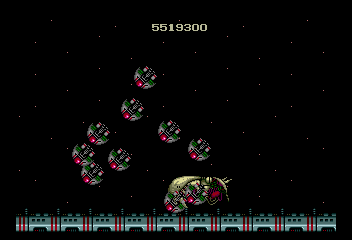
In Slime World, the player controls a character navigating side-scrolling levels filled with hostile slime creatures. The core objective appears to be reaching the end of each stage while avoiding or defeating the gelatinous enemies. The CD format allowed for enhanced audio, likely with a soundtrack and some voiced elements, though the gameplay stays rooted in traditional 2D platforming mechanics.
For retro gaming enthusiasts, Slime World represents the eclectic library of the PC Engine CD, a console known for its unique exclusives. While it may not be a standout title like some of the system's classics, its obscurity adds a layer of appeal for those seeking to explore every corner of the platform. If you enjoy niche platformers from the CD era, it's worth a look, but be prepared for rough edges typical of lesser-known releases.
GAME INFO
- Platform
- NEC PC Engine CD
- Genre
- Platformer
How to play Slime World online
To get started with Slime World, simply load the game in your emulator. The title screen will appear; press Start to begin. You'll be dropped into a side-scrolling level with slime enemies. The basic loop is to move right, jump over pits and onto platforms, and deal with enemies by jumping on them or using a projectile attack if available.
Keep an eye out for collectibles and power-ups scattered through the stages. Health is limited, so avoid taking too many hits. If you're playing a Japanese version, menus are in Japanese, but the gameplay is straightforward enough to navigate. Experiment with buttons to discover any special moves.
CONTROLS
Controls
- Arrow Keys: D-Pad / Movement
- X: I button
- S: II button
- Enter: Run / Start
- V: Select
Slime World FAQ
Who developed Slime World?
Development credits for Slime World are not widely documented. It is unclear which studio or individual created the game, and no reliable source confirms the developer.
Is Slime World exclusive to NEC PC Engine CD or did it appear on other systems?
Slime World appears to be exclusive to the NEC PC Engine CD. There are no confirmed ports to other platforms, though a similarly titled game exists on Atari Lynx, but it is a different title.
Does Slime World have a multiplayer or co-op mode?
It is not known whether Slime World supports multiplayer or co-op modes. The PC Engine CD version likely only includes single-player gameplay based on available information.
You may also like
All NEC PC Engine CD games









GAME INFO
- Platform
- NEC PC Engine CD
- Genre
- Platformer
COMMENTS (0)
No comments yet. Be the first to share your thoughts.