The game loads when you press Play · press “Play Now” inside the game if it asks.
Zero Wing
Zero Wing
Zero Wing - Shooter Classic
- NEC PC Engine CD
- Shooter
- 5· 0 votes
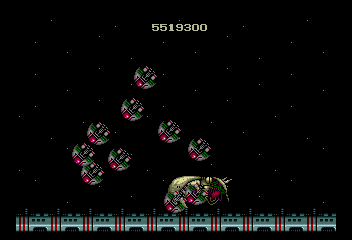
You control Trent, the lone pilot fighting against the alien pirate organization CATS. The core gameplay is straightforward: move your ship left and right, dodge enemy fire, and shoot down waves of foes. Power-ups appear frequently, letting you upgrade your main weapon or deploy options that follow your movement and add extra firepower. The difficulty ramps up quickly, so learning enemy patterns and when to grab upgrades is essential for survival.
What makes Zero Wing worth playing today is its tight, satisfying shooter design - a hallmark of Toaplan's output. The PC Engine CD version retains the arcade's frantic pacing and colorful visuals, though the sound is slightly different due to the hardware. If you enjoy old-school shoot 'em ups like Truxton or Twin Cobra, Zero Wing delivers a similar challenge. It's not a deep or story-driven game, but for a quick 30-minute blast through alien hordes, it holds up well.
GAME INFO
- Platform
- NEC PC Engine CD
- Genre
- Shooter
- Publisher
- Sega
- Developer
- Toaplan
- Released
- 1989
- Players
- 1
- Region
- Japan
How to play Zero Wing online
Getting Started
When you boot up Zero Wing, you'll see a Japanese title screen. Press Enter to start, then press the same button to confirm the default settings and begin the game. Since the menus are in Japanese, the simplest approach is to keep pressing the confirm button until the action starts. There is no story cutscene to skip - just a brief logo sequence and then you're in the first stage.
The core loop is simple: fly through each level, shoot everything that moves, and collect the red power-up capsules that drop from certain enemies. These capsules upgrade your main weapon's speed and strength. You also sometimes get a blue orb that adds a sidekick option (a small ship that mirrors your movement). Losing a life resets your weapon to the basic pea shooter, so try not to die early. The game is a straightforward horizontal shooter - no branching paths, no hidden secrets. Just dodge, shoot, and survive.
If you are unfamiliar with Japanese shooters, be aware that the difficulty is set high from the start. Use the Continue feature (press Start after dying) to keep playing, but watch out because continues are limited. The game ends when you run out of continues, so practice makes perfect. There is no save state or password system on the real hardware, though emulators let you save your progress at any point.
CONTROLS
Controls
- Arrow Keys: D-Pad / Movement
- X: I button
- S: II button
- Enter: Run / Start
- V: Select
Zero Wing FAQ
Is Zero Wing an official release, a fan hack, a prototype, or another kind of build?
Zero Wing on PC Engine CD is an official commercial port of Toaplan's 1989 arcade shooter. It is not a hack, prototype, or fan-made build - it was published by Toaplan for the Japanese market and is a fully licensed release.
Roughly how long does it take to finish Zero Wing?
A single playthrough takes about 20 to 30 minutes if you can reach the final stage without dying too much. However, the high difficulty means most players will need several attempts and continues, extending the total playtime to an hour or more before seeing the ending.
Is Zero Wing exclusive to NEC PC Engine CD or did it appear on other systems?
Zero Wing was originally an arcade game, and it also received ports to the Sega Mega Drive/Genesis and the PC Engine (HuCard) in addition to the PC Engine CD. The Mega Drive version is better known in the West, but the PC Engine CD version offers enhanced sound and the same frantic shooter action.
You may also like
All NEC PC Engine CD games Gradius 2 - Gofer no Yabou
 Golden Axe
 Ai Chou Aniki
 Asuka 120% Maxima Burning Fest
 Bishoujo Senshi Sailor Moon English translation
 Cardangels
 Kaizou Choujin Shubibinman III - Ikai no Princess
 Bomberman - Panic Bomber
 Fausseté Amour
 Magical Fantasy Adventure - Popful Mail
 Advanced Variable Geo
 3x3 Eyes - San Shigan Shousei
GAME INFO
- Platform
- NEC PC Engine CD
- Genre
- Shooter
- Publisher
- Sega
- Developer
- Toaplan
- Released
- 1989
- Players
- 1
- Region
- Japan
COMMENTS (0)
No comments yet. Be the first to share your thoughts.