The game loads when you press Play · press “Play Now” inside the game if it asks.
Rainbow Islands
Rainbow Islands
Rainbow Islands: PCE-CD Platformer
- NEC PC Engine CD
- Platformer
- 5· 0 votes
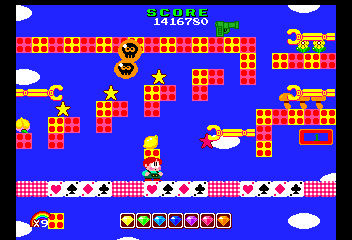
You control one of the two children from Bubble Bobble's ending, climbing through a series of islands by shooting rainbows. These rainbows can trap enemies, then shatter to defeat them, or be used as temporary platforms to reach higher ledges. Each island has a boss at the top, and the goal is to collect the seven gems of the rainbow to unlock the true ending. The core loop involves clearing enemies, gathering fruit and items for points, and navigating tricky jumps.
It's a solid port of a classic arcade game, well-liked for its cheerful art style and inventive rainbow mechanics. The PC Engine CD version adds CD-quality audio to the soundtrack, giving the game a bit more polish than earlier home ports. For fans of Taito's library or retro platformers, Rainbow Islands on PC Engine CD is a worthwhile pick-up, though it remains single-player only and can be finished in under an hour once you learn the levels.
GAME INFO
- Platform
- NEC PC Engine CD
- Genre
- Platformer
- Publisher
- Taito
- Developer
- Taito
- Released
- 1987
- Players
- 1
- Region
- Japan
How to play Rainbow Islands online
When you start the game, you'll be at the bottom of the first island. Move with the D-Pad to position yourself under enemies, then press X to jump and S to fire a rainbow. The rainbow arcs upward; if it hits an enemy, the enemy gets trapped inside a bubble. You can then jump on the rainbow to break it and defeat the enemy. Rainbows also linger for a moment and can be stood on, so use them as stepping stones to reach higher platforms.
Collect fruit and other items for bonus points - they also affect the game's ending. Each island has a specific number of enemies; after clearing them all, a large item appears. Reach the top of the island to fight a boss and advance. If this is the Japanese PC Engine CD release, the menus are entirely in Japanese, but the game is straightforward: press Start to begin and use the D-Pad to navigate the title screen (usually the top option starts the game).
CONTROLS
Controls
- Arrow Keys: D-Pad / Movement
- X: I button
- S: II button
- Enter: Run / Start
- V: Select
Rainbow Islands FAQ
Who developed Rainbow Islands?
Taito developed the original arcade game and its subsequent ports, including the PC Engine CD version.
Roughly how long does it take to finish Rainbow Islands?
A typical playthrough takes about 30 to 45 minutes once you are familiar with the levels. New players may take an hour or more to complete all seven islands.
Does Rainbow Islands have a multiplayer or co-op mode?
No, Rainbow Islands is strictly a single-player game. Unlike its predecessor Bubble Bobble, there is no cooperative mode.
You may also like
All NEC PC Engine CD games









GAME INFO
- Platform
- NEC PC Engine CD
- Genre
- Platformer
- Publisher
- Taito
- Developer
- Taito
- Released
- 1987
- Players
- 1
- Region
- Japan
COMMENTS (0)
No comments yet. Be the first to share your thoughts.