The game loads when you press Play · press “Play Now” inside the game if it asks.
Choujikuu Yousai Macross 2036
Choujikuu Yousai Macross 2036
What is Choujikuu Yousai Macross 2036?
- NEC PC Engine CD
- Shooter
- 5· 0 votes
GAME INFO
- Platform
- NEC PC Engine CD
- Genre
- Shooter
- Publisher
- Masaya
- Developer
- Masaya
- Released
- 1992
- Players
- 1
- Region
- Japan
How to play Choujikuu Yousai Macross 2036 online
Getting Started
When you first boot Choujikuu Yousai Macross 2036, you'll see a title screen with Japanese text. Press Enter to open the start menu, then use the arrow keys to highlight the first option (usually "ゲームスタート" or similar) and press X to confirm. If you need to adjust settings like difficulty or sound, look for an option that says "オプション" - select it to find those toggles. The game is entirely in Japanese, but the menu layout is standard for the era: top option starts the game, bottom options lead to configuration.
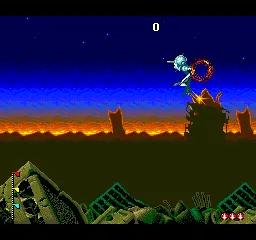
Once in the game, you control a Valkyrie mecha flying from left to right. Use the arrow keys to move, X to shoot your primary weapon, and S for a secondary attack (sometimes a bomb or special move). You can transform your mecha by pressing up or down while also tapping a button - but the exact mapping may vary. Experiment with Z and A to see if they trigger transformation. The goal is to shoot down all enemies, dodge their bullets, and collect floating power-ups that appear after enemy waves. Your ship's health bar is at the top of the screen; avoid collisions and incoming fire to survive to the end of the stage.
Levels are linear: you fly from left to right, fight a mid-boss partway through, then a final boss at the end. After clearing a stage, the story advances with a brief animated cutscene. Your lives are limited, and continuing typically requires pressing a button at the game over screen. If you get stuck, focus on learning the attack patterns of each boss and switching your transformation mode frequently - the battroid form has a smaller hitbox in some directions, and the fighter form lets you zip through tight spaces. Practice makes perfect, and the CD-quality soundtrack makes each attempt a treat.
CONTROLS
Controls
- Arrow Keys: D-Pad / Movement
- X: I button
- S: II button
- Enter: Run / Start
- V: Select
Choujikuu Yousai Macross 2036 FAQ
Is there anything iconic or memorable about Choujikuu Yousai Macross 2036?
The game is remembered for its faithful adaptation of the Macross anime, complete with animated cutscenes and a redbook audio soundtrack. The three-mode transformation system for the Valkyrie was a rare and well-executed feature in a 1992 shooter.
Is Choujikuu Yousai Macross 2036 exclusive to NEC PC Engine CD or did it appear on other systems?
It was released only for the NEC PC Engine CD in Japan and never ported to any other platform. No official Western version exists, making it a true exclusive for that hardware.
What makes Choujikuu Yousai Macross 2036 stand out among NEC PC Engine CD titles of its era?
The combination of licensed anime content, full-motion animation, and CD-quality sound set it apart from many other shooters on the system. It also had the unique transformation mechanic for the mecha, which added a tactical layer not common in horizontal shmups at the time.
You may also like
All NEC PC Engine CD games









GAME INFO
- Platform
- NEC PC Engine CD
- Genre
- Shooter
- Publisher
- Masaya
- Developer
- Masaya
- Released
- 1992
- Players
- 1
- Region
- Japan
COMMENTS (0)
No comments yet. Be the first to share your thoughts.