The game loads when you press Play · press “Play Now” inside the game if it asks.
Yoda Stories (USA)
Yoda Stories
Yoda Stories on GBC
- Game Boy Color
- Adventure
- 5· 0 votes
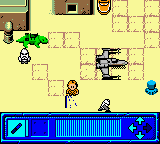
Yoda Stories is a Game Boy Color title that dropped in the late 90s as part of the Star Wars video game lineup. It's an adventure game with a grid-based layout, putting you in the boots of a young Luke Skywalker. The game came out in 1999 and was an officially licensed release for Nintendo's handheld. It's a quirky little piece of the Star Wars library that doesn't get talked about much these days.
In the game, you move Luke around a series of interconnected cells, using his lightsaber to interact with whatever is adjacent to him. The core loop involves cutting through obstacles, defeating enemies, and collecting items to progress. Each level presents a small puzzle or challenge that you solve by figuring out which cell to stab your lightsaber into next. It's not a full-fledged action game; think more of a tactical puzzle where patience and observation matter more than reflexes.
Yoda Stories is worth a look if you're curious about how game developers adapted the Star Wars universe into unusual genres on the Game Boy Color. It has a simple charm and a unique play style that sets it apart from the shooters and platformers of the era. It's a niche experience, but for fans of retro handheld games or those who want to see Luke in a puzzle format, it holds up as a curious oddity.
GAME INFO
- Platform
- Game Boy Color
- Genre
- Adventure
- Released
- 1999
- Players
- 1
- Region
- USA
How to play Yoda Stories online
When you start Yoda Stories, you'll see a grid of cells with Luke in one of them. Use the D-Pad to move him around. Press X (A) to confirm selections or use your lightsaber on adjacent cells; pressing S (B) lets you cancel or run. The objective changes from level to level, but usually you need to clear a path to an exit or collect a certain item. Try using your lightsaber on different cell walls or enemies to see what happens. The game is turn-based in a way - enemies only move when you do - so take your time planning your steps. Each level is small, so experimentation is key.
CONTROLS
Controls
- Arrow Keys: D-Pad / Movement
- X: A button (jump / confirm)
- S: B button (run / attack / cancel)
- Enter: Start / Pause
- V: Select
Yoda Stories FAQ
Is Yoda Stories an official release, a fan hack, a prototype, or another kind of build?
It is an officially licensed Star Wars game for the Game Boy Color, released commercially in 1999. It is not a hack, prototype, or fan creation.
What type of game is Yoda Stories?
An adventure game where you control a young Luke Skywalker on a grid, using his lightsaber to interact with adjacent cells. The gameplay is puzzle-focused with light tactical movement.
Is there anything iconic or memorable about Yoda Stories?
Its grid-based lightsaber mechanic is unusual for a Star Wars game, and the whole presentation feels like a handheld take on a board game or logic puzzle. That makes it a distinctive title in the franchise's game history.
You may also like
All Game Boy Color games











GAME INFO
- Platform
- Game Boy Color
- Genre
- Adventure
- Released
- 1999
- Players
- 1
- Region
- USA
COMMENTS (0)
No comments yet. Be the first to share your thoughts.