CHOOSE A VERSION
2 versions · same consoleChoose an original release, regional version, revision, bootleg or clearly labelled ROM hack/mod, then press Play. Hacks may change the gameplay. Switching versions restarts the player.
Selected: Default · USA · USA
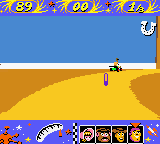
The game loads when you press Play · press “Play Now” inside the game if it asks.
Toy Story Racer (USA)
Toy Story Racer
Toy Story Racer: GBC Racing
- Game Boy Color
- Racing
- 5· 0 votes
GAME INFO
- Platform
- Game Boy Color
- Genre
- Racing
- Publisher
- Activision
- Developer
- Traveller's Tales
- Released
- 2001
- Players
- 1
- Region
- USA
How to play Toy Story Racer online
Getting Started
When you boot up Toy Story Racer, you are taken to a title screen where you can press Start to proceed. From the main menu, select a single player mode to begin racing. You will choose a character from the Toy Story cast, each with slightly different handling stats, then pick a track. The goal is to complete laps and finish as high as possible.
During the race, you steer with the D-Pad and use the A button to accelerate or jump, depending on context. The B button activates items you collect from item boxes placed around the track. Items include speed boosts, projectiles, and defensive shields. The race ends after a set number of laps, and your position determines if you unlock the next cup or track.
There is no save feature built into the cartridge for this game, so progression is lost when you turn off the system. If you are playing through an emulator, use save states to keep your progress. The game is entirely in English, so menus are easy to navigate. Practice drifting by holding the D-Pad and tapping the A button to sharpen turns and maintain speed.
CONTROLS
Controls
- Arrow Keys: D-Pad / Movement
- X: A button (jump / confirm)
- S: B button (run / attack / cancel)
- Enter: Start / Pause
- V: Select
Toy Story Racer FAQ
Can players save progress in Toy Story Racer?
The Game Boy Color version of Toy Story Racer does not include a battery-backed save. Progress is not retained when the console is turned off, so players must rely on save states when using an emulator to continue from where they left off.
Does Toy Story Racer have a multiplayer or co-op mode?
Multiplayer options are not officially documented for the Game Boy Color release. The cartridge lacks a link cable port, so the game is strictly a single-player experience. The PlayStation version, however, supports split-screen multiplayer.
Is Toy Story Racer exclusive to Game Boy Color or did it appear on other systems?
The same title was released simultaneously for the PlayStation. While both versions share the Toy Story theme and racing concept, the gameplay and graphics differ significantly due to the hardware limitations of the Game Boy Color. No other ports are known.
You may also like
All Game Boy Color games











GAME INFO
- Platform
- Game Boy Color
- Genre
- Racing
- Publisher
- Activision
- Developer
- Traveller's Tales
- Released
- 2001
- Players
- 1
- Region
- USA
COMMENTS (0)
No comments yet. Be the first to share your thoughts.