The game loads when you press Play · press “Play Now” inside the game if it asks.
Tintin in Tibet (Europe) (En,Fr,De,Es,It,Nl,Sv)
Tintin in Tibet
Tintin in Tibet Overview
- Game Boy Color
- Platformer
- 5· 0 votes
Tintin in Tibet is a platformer for the Game Boy Color based on Hergé's classic comic of the same name. This European release supports English, French, German, Spanish, Italian, Dutch, and Swedish, making it accessible to a wide audience. The game arrived during the later years of the Game Boy Color, when licensed platformers were common, but details on its developer and publisher are not widely documented.
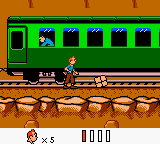
You control Tintin across side-scrolling levels, jumping over obstacles and using a simple attack to deal with enemies. The core loop involves moving rightward, collecting items, and avoiding hazards to reach the end of each stage. The platforming is straightforward, with an emphasis on timing jumps and managing enemy patterns, typical of the era's genre titles.
Today, this game is a decent example of a licensed platformer on the Game Boy Color. It is not groundbreaking, but it faithfully adapts the comic's setting. For fans of Tintin or anyone curious about less common GBC platformers, it is worth a quick play. The multi-language support also makes it a neat piece of European retro gaming history.
GAME INFO
- Platform
- Game Boy Color
- Genre
- Platformer
- Players
- 1
- Region
- Europe
How to play Tintin in Tibet online
To start playing, select a language from the title screen using the D-Pad and press X to confirm. The game then begins with a short intro or directly on the first level. You move Tintin with the Arrow Keys, jump with X, and attack with S. Your goal is to reach the end of each stage while avoiding or defeating enemies.
The core loop involves exploring each level, collecting items like diamonds and keys, and overcoming obstacles such as pits and platforms. Enemies can be dispatched by jumping on them or using your attack. Some levels have hidden paths or require careful timing. Lives and continues are limited, so practice makes progress. If you get stuck, explore every area for helpful items.
CONTROLS
Controls
- Arrow Keys: D-Pad / Movement
- X: A button (jump / confirm)
- S: B button (run / attack / cancel)
- Enter: Start / Pause
- V: Select
Tintin in Tibet FAQ
Who developed Tintin in Tibet?
The developer of this Game Boy Color version is not widely documented. It is often attributed to Bit Managers, but concrete confirmation is lacking.
Does Tintin in Tibet have a multiplayer or co-op mode?
No multiplayer or co-op options exist. This is a single-player platformer only.
Is Tintin in Tibet exclusive to Game Boy Color or did it appear on other systems?
This specific version is exclusive to the Game Boy Color. A separate game with the same title was released on other platforms like PC and Game Boy Advance, but those are different builds.
You may also like
All Game Boy Color games











GAME INFO
- Platform
- Game Boy Color
- Genre
- Platformer
- Players
- 1
- Region
- Europe
COMMENTS (0)
No comments yet. Be the first to share your thoughts.