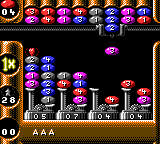
The game loads when you press Play · press “Play Now” inside the game if it asks.
Swing (Germany)
Swing
What is Swing?
- Game Boy Color
- Puzzle
- 5· 0 votes
GAME INFO
- Platform
- Game Boy Color
- Genre
- Puzzle
- Developer
- Software 2000
- Released
- 1997
- Players
- 1
- Region
- Europe
How to play Swing online
Getting Started
When you start Swing on the Game Boy Color, you're presented with a title screen. Use the D-Pad to select "Start Game" and press X (A button) to confirm. The game is entirely in English, so navigating menus is straightforward.
Once in a level, your marble is controlled with the D-Pad. Pressing X or S performs no special action - movement is the primary control. The objective is to reach the exit, often marked by a glowing portal or a flag. Obstacles such as pits, bumpers, and switches must be avoided or used strategically.
There is no timer, so take time to study each layout before moving. If you fall off the edge or hit a hazardous object, the level restarts from the beginning. The game saves progress automatically after you complete a set number of stages, but there is no password system. Focus on learning the physics: the marble slides slightly after releasing the D-Pad, so anticipate momentum.
CONTROLS
Controls
- Arrow Keys: D-Pad / Movement
- X: A button (jump / confirm)
- S: B button (run / attack / cancel)
- Enter: Start / Pause
- V: Select
Swing FAQ
Which regions was Swing released in?
Swing was released in Europe, specifically Germany, under the title Swing. In the United States the game was renamed Marble Master and released on PlayStation and PC. The Game Boy Color version appears to have stayed in Europe.
What makes Swing stand out among Game Boy Color titles of its era?
It is one of the few marble-based puzzle games on the Game Boy Color, originally from a more powerful home console. The port's simple visuals and precise physics set it apart from typical platformers or action games on the system.
Roughly how long does it take to finish Swing?
Playtime varies but most players finish the game in under two hours. There are around 30 levels, and each can be solved in a few minutes once the pattern is understood.
You may also like
All Game Boy Color games











GAME INFO
- Platform
- Game Boy Color
- Genre
- Puzzle
- Developer
- Software 2000
- Released
- 1997
- Players
- 1
- Region
- Europe
COMMENTS (0)
No comments yet. Be the first to share your thoughts.