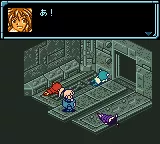
The game loads when you press Play · press “Play Now” inside the game if it asks.
Star Ocean - Blue Sphere (Japan)
Star Ocean - Blue Sphere
Star Ocean - Blue Sphere: GBC RPG
- Game Boy Color
- RPG
- 5· 0 votes
GAME INFO
- Platform
- Game Boy Color
- Genre
- RPG
- Released
- 2001
- Players
- 1
- Region
- Japan
How to play Star Ocean - Blue Sphere online
Getting Started
When you first start Star Ocean - Blue Sphere, you will be asked to choose a name for your main character and possibly select a difficulty. Because this is a Japanese-only cartridge, all menus and dialogue are in Japanese. If you do not read the language, consider applying a fan translation patch to the ROM before playing. Otherwise, learn to recognize common menu symbols: a star for save, a sword for equipment, and a speech bubble for talking.
The core loop involves traveling between towns and dungeons, talking to NPCs to advance the story, and fighting monsters in real-time battles. You control one character directly while AI handles the rest. Use the D-Pad to move, press X to confirm selections or attack, and B to cancel or run. In battle, you can pause to access items or change tactics. Save often at save points shaped like glowing spheres found in towns and dungeons.
Pay attention to Private Actions in towns, where talking to party members alone can unlock character events and affect which ending you see. Experiment with the skill system to craft better gear and items. The game expects some patience with menus even in English, so take your time exploring every area.
CONTROLS
Controls
- Arrow Keys: D-Pad / Movement
- X: A button (jump / confirm)
- S: B button (run / attack / cancel)
- Enter: Start / Pause
- V: Select
Star Ocean - Blue Sphere FAQ
Who developed Star Ocean - Blue Sphere?
tri-Ace developed Star Ocean - Blue Sphere, the same studio behind the earlier Star Ocean titles. The game was published by Enix.
What type of game is Star Ocean - Blue Sphere?
It is a role-playing game with real-time combat, exploration of a fantasy-sci-fi world, and character progression through levels and skills. The sequel connection to Star Ocean: The Second Story means it shares similar mechanics.
Can players save progress in Star Ocean - Blue Sphere?
Progress is saved using the cartridge's battery backup. Save points appear as glowing spheres in towns and dungeons, and the game also auto-saves at certain story milestones.
You may also like
All Game Boy Color games
GAME INFO
- Platform
- Game Boy Color
- Genre
- RPG
- Released
- 2001
- Players
- 1
- Region
- Japan
COMMENTS (0)
No comments yet. Be the first to share your thoughts.