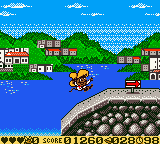
The game loads when you press Play · press “Play Now” inside the game if it asks.
Speedy Gonzales - Aztec Adventure (USA)
Speedy Gonzales - Aztec Adventure
Speedy Gonzales - Aztec Adventure Overview
- Game Boy Color
- Platformer
- 5· 0 votes
GAME INFO
- Platform
- Game Boy Color
- Genre
- Platformer
- Region
- USA
How to play Speedy Gonzales - Aztec Adventure online
CONTROLS
Controls
- Arrow Keys: D-Pad / Movement
- X: A button (jump / confirm)
- S: B button (run / attack / cancel)
- Enter: Start / Pause
- V: Select
Speedy Gonzales - Aztec Adventure FAQ
Can players save progress in Speedy Gonzales - Aztec Adventure?
It is not widely documented whether this game includes a save feature. Many Game Boy Color platformers from the same era used password systems or battery-backed saves, but no reliable source confirms which method, if any, is used here. Without an official manual, the safest assumption is that progress is lost when the console is turned off.
In what year was Speedy Gonzales - Aztec Adventure originally released?
The exact release year is not widely documented in available online archives. The game was released for the Game Boy Color, which launched in 1998, and most licensed titles appeared between 1999 and 2001, but no specific date can be given with certainty.
Which regions was Speedy Gonzales - Aztec Adventure released in?
The title includes "(USA)" in its ROM filename, indicating it was released in the United States. Whether it also launched in other regions like Europe or Japan is unclear from current sources, but the standard ROM label points to a North American release.
You may also like
All Game Boy Color games











GAME INFO
- Platform
- Game Boy Color
- Genre
- Platformer
- Region
- USA
COMMENTS (0)
No comments yet. Be the first to share your thoughts.