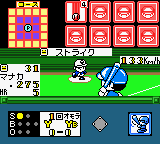
The game loads when you press Play · press “Play Now” inside the game if it asks.
Real Pro Yakyuu! - Central League Hen (Japan)
Real Pro Yakyuu! - Central League Hen
Inside Real Pro Yakyuu! - Central League Hen
- Game Boy Color
- Sports
- 5· 0 votes
GAME INFO
- Platform
- Game Boy Color
- Genre
- Sports
- Region
- Japan
How to play Real Pro Yakyuu! - Central League Hen online
Getting Started
When you boot up Real Pro Yakyuu! - Central League Hen, you will be greeted with a title screen in Japanese. Use the D-pad to navigate menus and press the A button (X key) to confirm selections. At the main menu, you likely choose between game modes such as exhibition or season. Since the text is Japanese, look for familiar baseball terms or rely on trial and error to understand the options. The first step is usually to pick a team from the Central League.
Once a game begins, the core loop is straightforward: bat when your team is at bat, pitch and field when on defense. The D-pad moves a cursor during batting and pitching. Press the A button to swing, and the B button to throw to bases or pitch. The game likely provides feedback with on-screen indicators, but all menus and text remain in Japanese. Experiment with the controls until you get a feel for timing and responses.
If you cannot read Japanese, the game is still playable once you memorize the menu layout. Pay attention to the cursor positioning during batting and time your swings carefully. Pitching may involve selecting pitch types and locations. Do not expect tutorials; the manual (if available) would explain details, but in an emulator, you may need to rely on genre knowledge. With patience, you can enjoy a functional baseball game that plays much like other 8-bit sports titles of its era.
CONTROLS
Controls
- Arrow Keys: D-Pad / Movement
- X: A button (jump / confirm)
- S: B button (run / attack / cancel)
- Enter: Start / Pause
- V: Select
Real Pro Yakyuu! - Central League Hen FAQ
Who developed Real Pro Yakyuu! - Central League Hen?
The developer of this specific Game Boy Color title is not widely documented. It was likely created by a Japanese studio that produced sports games for the platform, but no definitive source confirms the development team.
Is Real Pro Yakyuu! - Central League Hen an official release, a fan hack, a prototype, or another kind of build?
It is an official commercial release for the Game Boy Color, sold exclusively in Japan during the system's retail lifecycle. It is not a hack, prototype, or homebrew.
Is Real Pro Yakyuu! - Central League Hen considered easy to pick up or challenging?
The gameplay itself is typical of handheld baseball games and is not mechanically complex. However, non-Japanese readers will face a challenge due to all menus being in Japanese, which may require trial and error or external guidance to navigate effectively.
You may also like
All Game Boy Color games











GAME INFO
- Platform
- Game Boy Color
- Genre
- Sports
- Region
- Japan
COMMENTS (0)
No comments yet. Be the first to share your thoughts.