The game loads when you press Play · press “Play Now” inside the game if it asks.
Pop'n Music GB - Disney Tunes (Japan)
Pop'n Music GB - Disney Tunes
Pop'n Music GB - Disney Tunes: GBC Music
- Game Boy Color
- Music
- 5· 0 votes
GAME INFO
- Platform
- Game Boy Color
- Genre
- Music
- Players
- 1
- Region
- Japan
How to play Pop'n Music GB - Disney Tunes online
Getting Started
When the game starts, you will see a Japanese title screen. Press Enter to proceed. The menus are entirely in Japanese, but the layout is straightforward - options for song selection, settings, and high scores are typically represented by icons or familiar arcade patterns. To play, choose a song from the list (songs are often named in English or with recognizable Disney characters). Once selected, the rhythm gameplay begins.
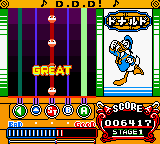
As music plays, notes scroll down the screen in vertical lanes. Each lane corresponds to a button: the D-Pad arrows and the face buttons (A, B, X, Y). Your goal is to press the matching button exactly when the note reaches the target zone at the bottom. Hold combos by staying accurate. Missing notes will drain your health bar (or equivalent). The game ends if you fail too many notes, but you can keep trying until you reach the end of the song.
Because this is a Japanese import, you might want to experiment with button mapping until it feels natural. Start with the default keyboard controls above and adjust if needed. The game does not offer much in the way of tutorials, so rely on your sense of rhythm and patience. Enjoy the Disney melodies while tapping along!
CONTROLS
Controls
- Arrow Keys: D-Pad / Movement
- X: A button (jump / confirm)
- S: B button (run / attack / cancel)
- Enter: Start / Pause
- V: Select
Pop'n Music GB - Disney Tunes FAQ
Who developed Pop'n Music GB - Disney Tunes?
The developer is not widely documented in English sources. It was likely handled by Konami's internal teams, as Pop'n Music is part of their Bemani line, but no specific studio name has been confirmed for this Game Boy Color version.
Which regions was Pop'n Music GB - Disney Tunes released in?
This game was released exclusively in Japan. There was no international release for the Game Boy Color, so copies were only available through import channels.
Does Pop'n Music GB - Disney Tunes have a multiplayer or co-op mode?
No, this is a single-player-only title. The Game Boy Color hardware and the rhythm game design focus on solo play, with no support for link cables or multiplayer features.
You may also like
All Game Boy Color games











GAME INFO
- Platform
- Game Boy Color
- Genre
- Music
- Players
- 1
- Region
- Japan
COMMENTS (0)
No comments yet. Be the first to share your thoughts.